


- Key Takeaways
- Who Are Frontline Workers, and Why Do They Need Their Own Apps?
- 12 Frontline Worker App Development Ideas
- What Makes a Frontline App User Friendly?
- Should You Buy a Frontline App or Build One?
- What Does a Frontline App Need Under the Hood?
- How Expert App Devs Builds Frontline Apps
- Frequently Asked Questions
- Conclusion
Ready to transform your vision into reality?
Get Started
Frontline Worker App Ideas Businesses Are Building
 23
 0
16 Nov 2026
20 Min Read


 Share

 Download PDF
The frontline worker apps businesses are building most are communication apps, shift scheduling, mobile attendance, digital checklists and inspections, quality reporting linked to a QMS, safety incident reporting, connected worker apps for manufacturing, training with an AI assistant, store task apps, lone worker safety, employee self service and feedback apps. The best ones work without a company email, on shared devices, offline and in the worker's own language.
Key Takeaways
- Most frontline staff have no company email or desk, so office tools miss them.
- Start with the job that wastes the most time today: usually scheduling, attendance or paper checklists.
- Buy for simple messaging. Build when your workflows, systems or headcount make packaged tools a poor fit.
- Shared devices, offline use and quick login matter more than a long feature list.
Who Are Frontline Workers, and Why Do They Need Their Own Apps?
Frontline workers are people who do their jobs on site rather than at a desk: factory operators, construction crews, nurses and carers, store staff, drivers, warehouse pickers, cleaners and field technicians. A report by The Josh Bersin Company and UKG puts frontline jobs at about 80% of the global workforce, or roughly 2.7 billion people.
Source: The Josh Bersin Company with UKG, Powering the Frontline Workforce: How Frontline-First Companies Thrive, 2025. The workforce share is the report's estimate.
Most workplace software was designed for office staff with a laptop and an email address. Frontline staff often have neither. In Microsoft's frontline study, 63% of frontline workers said messages from leadership do not reach them, and about a third said they lack the right technology to do their jobs well.
Source: Microsoft Work Trend Index, Technology Unlocks a New Future for Frontline, published 12 January 2022. Survey of 9,600 frontline workers in 8 industries and 8 countries by Edelman Data x Intelligence, fielded in late 2021. Older data, still one of the largest frontline surveys.
That gap is the opportunity. A well built frontline app replaces paper, noticeboards, WhatsApp groups and phone calls with one simple tool that fits the job.
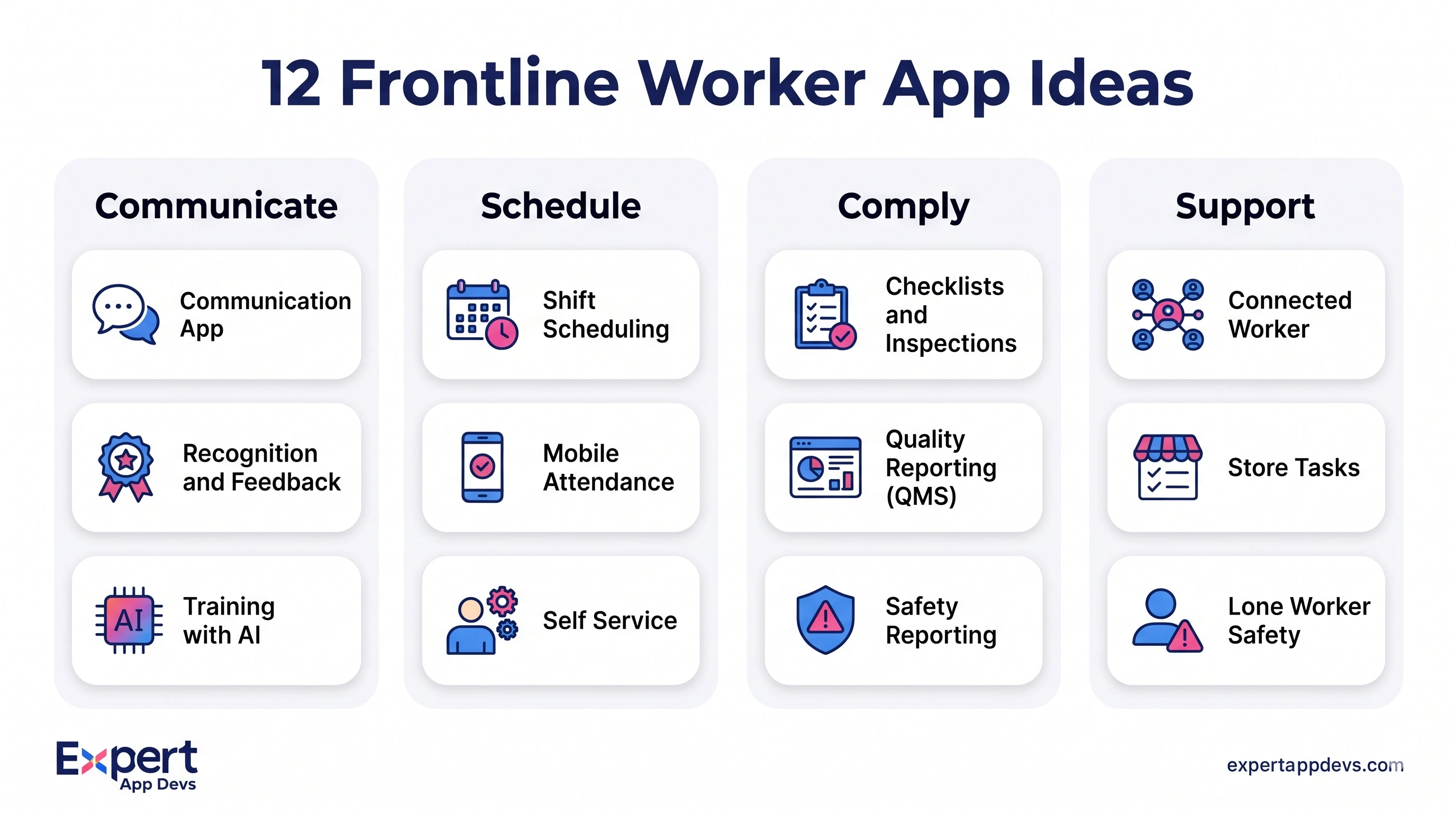
12 Frontline Worker App Development Ideas
1. Frontline Worker Communication App
A company news feed, team chat and announcements app that reaches staff without email. Key features: sign in with a phone number or employee ID, read receipts on important notices, automatic translation, voice notes, and targeting by site, shift or role. Managers see who has not read a safety notice and can follow up before the shift starts.
Best for: retail chains, hospitals, logistics and any business that still relies on noticeboards or personal WhatsApp groups.
2. Shift Scheduling and Shift Swap App
Staff see their rota, request leave, offer shifts and pick up open shifts from their phone. Managers approve swaps with skill and overtime rules checked automatically. Integrating with payroll removes the double entry that causes pay errors.
Best for: healthcare, hospitality, retail and manufacturing with rotating shifts.
3. Mobile Attendance With Geofencing and Face Check
Staff clock in from their phone, but only when they are inside an approved site boundary, and a selfie check confirms it is really them. This replaces punch cards and biometric machines that break or are hard to reach for outdoor teams.
Real result: for a Swiss enterprise with 26+ offices, factories and outdoor sites, we built a mobile attendance app with face recognition running on the phone (TensorFlow Lite), GPS geofencing and payroll integration. The client reports 99.3% attendance accuracy, 180+ HR hours saved every month and 70% faster payroll processing.
4. Digital Checklists and Inspections
Replace paper checklists for opening and closing, cleaning, equipment checks and site audits. Each item can require a photo, a reading or a signature, and failed items create a follow up task automatically. Managers see completion by site in real time instead of collecting paper at the end of the week.
5. Quality Reporting App Integrated With Your QMS
Operators spot quality issues first but often report them late, on paper, or not at all. A quality app lets them log a non conformance in under a minute: scan the part or batch, take photos, pick a defect type, and submit. The record goes straight into your quality management system (QMS) to start the corrective action process.
The value comes from the integration, not the form. If the QMS does not receive the record automatically, someone retypes it, and the delay returns.
Best for: manufacturing, food production and any ISO 9001 environment.
6. Safety Incident and Near Miss Reporting for Construction Crews
Construction crews need to report hazards and near misses fast, often with gloves on and no signal. Design for large buttons, photo and voice capture, offline submission, and GPS tagging of the location. Add toolbox talk sign off and permit to work checks so the same app covers daily safety routines.
7. Connected Worker App for Manufacturing
A connected worker app links operators to machines and systems. It shows step by step work instructions with images, displays live machine status, lets operators raise an andon alert for help, and logs downtime reasons. Data flows to and from the MES, ERP and maintenance system.
When manufacturers ask which platforms to trust for this, the honest answer is: one that integrates with the systems you already run. Packaged connected worker platforms suit standard processes. Custom apps suit plants with their own systems, mixed equipment or processes that give them an edge.
8. Training and Microlearning With an AI Assistant
Short lessons, videos and quizzes on the phone, plus an assistant that answers questions from your own SOPs and manuals: "How do I reset line 3 after a jam?" The assistant must answer only from approved documents, show which document the answer came from, and say clearly when it does not know.
Our AI development team builds these assistants so they only use content you approve.
9. Store Task Management App for Retail
Head office sends tasks (planograms, price changes, promotions) to stores, and staff complete them with photo proof. Area managers see which stores are behind. This replaces emails to store managers that never reach the people doing the work.
10. Lone Worker Safety App
For staff who work alone, such as carers, security guards, utility engineers and cleaners. Features include timed check ins, an SOS button that shares location, automatic alerts when a check in is missed, and optional fall detection through a smartwatch. Our wearable app team connects these devices to your alert system.
11. Employee Self Service App
Payslips, leave balances, leave requests, policy documents and HR forms on the phone, without a company email login. This is often the feature that gets staff to install the app in the first place, which then makes communication and training easier to roll out.
12. Recognition, Feedback and Pulse Survey App
Quick polls, anonymous feedback and peer recognition. Frontline turnover is high in many sectors (the Bersin report cites up to 150% in restaurants), so knowing early when a site is unhappy is worth a lot. Keep surveys to two or three questions and show staff what changed because of their answers.
What Makes a Frontline App User Friendly?
People often search for "the most user friendly connected worker app". For frontline staff, user friendly means a short list of practical things, and a long feature list usually works against it.
- No company email needed: sign in with a phone number, employee ID, badge scan or passkey.
- Fast login on shared devices: switching user should take seconds, and each user's data must clear at logout.
- Works offline: forms, checklists and reports save on the device and sync later.
- Their language: interface and messages in the languages your staff actually speak.
- Big targets, few steps: usable with gloves, in sunlight, while walking.
- Photo and voice first: typing is the slowest input on site.
- Respects off duty time: quiet hours for notifications outside a worker's shift.
A Real Pattern to Design For: The Shared Tablet
A ward shares one tablet per shift. A nurse starts an incident report, is called away, and the next nurse logs in. If the app stores drafts on the device without tying them to a user, the second nurse sees the first nurse's unfinished report, including patient details. No hacker was involved, yet private data was exposed.
The fix: store drafts per user and encrypt them, clear the session and screen on user switch, and sync or securely park unfinished drafts for the original author. This must be designed in from the start, not patched after launch.
Frontline App Launch Checklist
- Can a new starter sign in on day one without IT help?
- Does every core screen work with no signal?
- Does logging out on a shared device clear all of that user's data?
- Are notifications silenced outside each worker's shift?
- Has the app been tested by real staff, on site, wearing their usual gear?
- Is there one clear owner for content and announcements at each site?
Should You Buy a Frontline App or Build One?
Packaged tools such as Microsoft Teams with Shifts, Connecteam or Workvivo work well for messaging, simple scheduling and surveys. A custom app makes sense when your workflows are unique, when the app must connect deeply to your own systems (QMS, MES, ERP, payroll), or when per user licences become expensive at your headcount.
| Situation | Buy | Build | Hybrid |
|---|---|---|---|
| Company news and chat only | Yes | ||
| Attendance with your own payroll rules | Yes | ||
| Quality or safety reporting into your QMS | Yes | Yes, if your QMS has a mobile add on that covers most needs | |
| Connected worker app with machine data | Yes, for mixed equipment or custom systems | Yes, packaged platform plus custom integrations | |
| Thousands of staff across many sites | Often, once licence costs pass build costs | Yes, buy messaging, build the workflow app |
Example: Licence vs Custom App Over 3 Years
This is an illustration, not a quote and not a market average. Replace each assumption with real prices from vendors and partners.
Scope assumed: a frontline app with communication, shift view, attendance and checklists. Packaged tool assumed at $6 per user per month plus $15,000 for setup and integration. Custom build assumed at 5 roles for 4 months, then half a role for support, at a blended $4,000 per role per month, plus hosting.
| Item (3 years) | 500 workers | 3,000 workers |
|---|---|---|
| Packaged tool licences | 500 x $6 x 36 = $108,000 | 3,000 x $6 x 36 = $648,000 |
| Packaged tool setup and integration | $15,000 | $15,000 |
| Packaged total | $123,000 | $663,000 |
| Custom build (5 roles x 4 months) | $80,000 | $80,000 |
| Custom support (0.5 role x 32 months) | $64,000 | $64,000 |
| Hosting (36 months) | $500 a month = $18,000 | $1,500 a month = $54,000 |
| Custom total | $162,000 | $198,000 |
In this example, buying is cheaper for 500 workers, and building is far cheaper for 3,000. The crossover point depends on your real licence price, headcount and how much custom integration the packaged tool needs. Cost is also not the only factor: ownership of the workflow and data, and fit with your systems, often decide it.
What Does a Frontline App Need Under the Hood?
- Cross platform app: Flutter or React Native, so one team supports Android and iOS. Our Flutter team builds most of our frontline apps this way.
- Device management: shared and company devices enrolled in kiosk or dedicated mode through your device management tool.
- Identity: phone number, badge or passkey login linked to your HR system, so leavers lose access automatically.
- Offline storage and sync: designed for conflicts from day one.
- Integrations: HR and payroll, QMS, MES, ERP and maintenance systems through APIs.
- Admin web portal: for managers to publish content, assign tasks and see reports.
For the wider picture, read our guide to enterprise mobility trends for 2027.
How Expert App Devs Builds Frontline Apps
- Attendance and HR: the AI attendance app for a Swiss enterprise: on device face recognition, geofencing, payroll integration, 99.3% reported accuracy.
- Field and partner teams: Pidilite's LetsMultiply app for contractors, covering quotations, ordering, staff management and dealer links across 12 modules, reporting 50K+ users.
- Workforce tools: a staff management app for scheduling, attendance, payroll and performance, and a time management app for employee tracking.
- Ownership: you own the code, and we sign NDAs before work starts.
Ways to work with us: a full build through our mobile app development services, or extra capacity by hiring dedicated mobile app developers. You can test a developer through our 40 hour free trial.
Planning a frontline app? Tell us about your teams, sites and systems, and we will suggest which idea to start with.
Frequently Asked Questions
What is a frontline worker app?
It is a mobile app built for staff who work on site rather than at a desk. It usually covers communication, schedules, attendance, checklists, training and safety, and works without a company email.
What is the best frontline worker communication app?
For simple news and chat, packaged tools work well. If communication must connect to attendance, safety or quality workflows, a custom app that links to your own systems is often the better fit.
What is a connected worker app?
A connected worker app links frontline staff to machines, data and experts. It shows work instructions, live equipment status and alerts, and sends data back to systems such as MES, ERP and QMS.
Can frontline apps integrate with quality management software?
Yes. A mobile quality app can send non conformance reports, photos and batch details straight into your QMS through its API, so corrective actions start without retyping.
What should a construction crew app include?
Offline use, photo and voice capture, near miss and incident reporting, toolbox talk sign off, permit checks, GPS tagging and large buttons that work with gloves.
How long does it take to build a frontline worker app?
A focused first version with two or three core features typically takes three to five months. Integrations with payroll, QMS or ERP are usually what extends the timeline.
Conclusion
The best frontline app is not the one with the most features. It is the one that removes the slowest, most error prone task your staff do today, works on the devices and networks they actually have, and connects to the systems your managers already use. Start with one idea, measure the time or errors it saves, then add the next.




 527

 0


 637
0
 689
0
 642
0