



- Key Takeaways
- What Is a Field Service App?
- 12 Field Service App Development Ideas
- Must Have Features in a Field Service Mobile App
- Should You Buy a Field Service Management App or Build One?
- Recommended Tech Stack and Timeline
- How Expert App Devs Builds Field Service Apps
- Frequently Asked Questions
- Conclusion
Ready to transform your vision into reality?
Get Started
Field Service App Development Ideas, Features and Costs
 13
 1
13 Nov 2026
22 Min Read


 Share

 Download PDF
A field service app helps businesses plan, dispatch and complete work at customer sites. The most valuable ideas to build are a technician mobile app, AI scheduling and dispatch, route optimisation, customer booking and live tracking, van stock management, on site quotes and payments, remote video assistance, an AI troubleshooting assistant, IoT based maintenance alerts, a manager dashboard, industry apps such as HVAC, and compliance forms. Buy a packaged field service management (FSM) tool if your process is standard; build or extend one if your workflows, scale or integrations are not.
Key Takeaways
- Mobile apps with live data are now the most common field service technology.
- The biggest gains come from scheduling, first time fixes and removing paperwork.
- Offline use and safe syncing matter more in the field than almost any other feature.
- Many companies get the best result from a hybrid: a packaged FSM core plus a custom technician or customer app.
What Is a Field Service App?
A field service app is software that manages work done at a customer's location: installations, repairs, maintenance and inspections. It usually has three parts: a mobile app for technicians, a web portal for dispatchers and managers, and often a customer app or portal for booking and tracking. Together these are called field service management (FSM).
Mobile is now the centre of it. In a 2025 survey of field service leaders, 85% said they use mobile apps with real time data access and updates, the most widely used technology in the survey, and 76% said their workforce already uses AI powered scheduling and dispatch.
Source: Field Service Insights, sponsored by Geotab, The 2025 State of Field Service Report. Survey of 100 senior field service leaders. Small sample; the figures show what these leaders use, not results.
Better tools also link to better results. In Deloitte Digital's research, the most technologically mature field service organisations reported a 73% first time fix rate, against 64% for the least mature.
Source: Deloitte Digital, Technological maturity pays off for field service organizations, January 2026. Survey of 900 director level and above field service leaders at organisations with 1,000+ employees and $500M+ revenue, June to August 2025, designed by Lawless Research and sponsored by Deloitte Digital. Shows a link between maturity and fix rates, not proof that an app alone causes the gain.
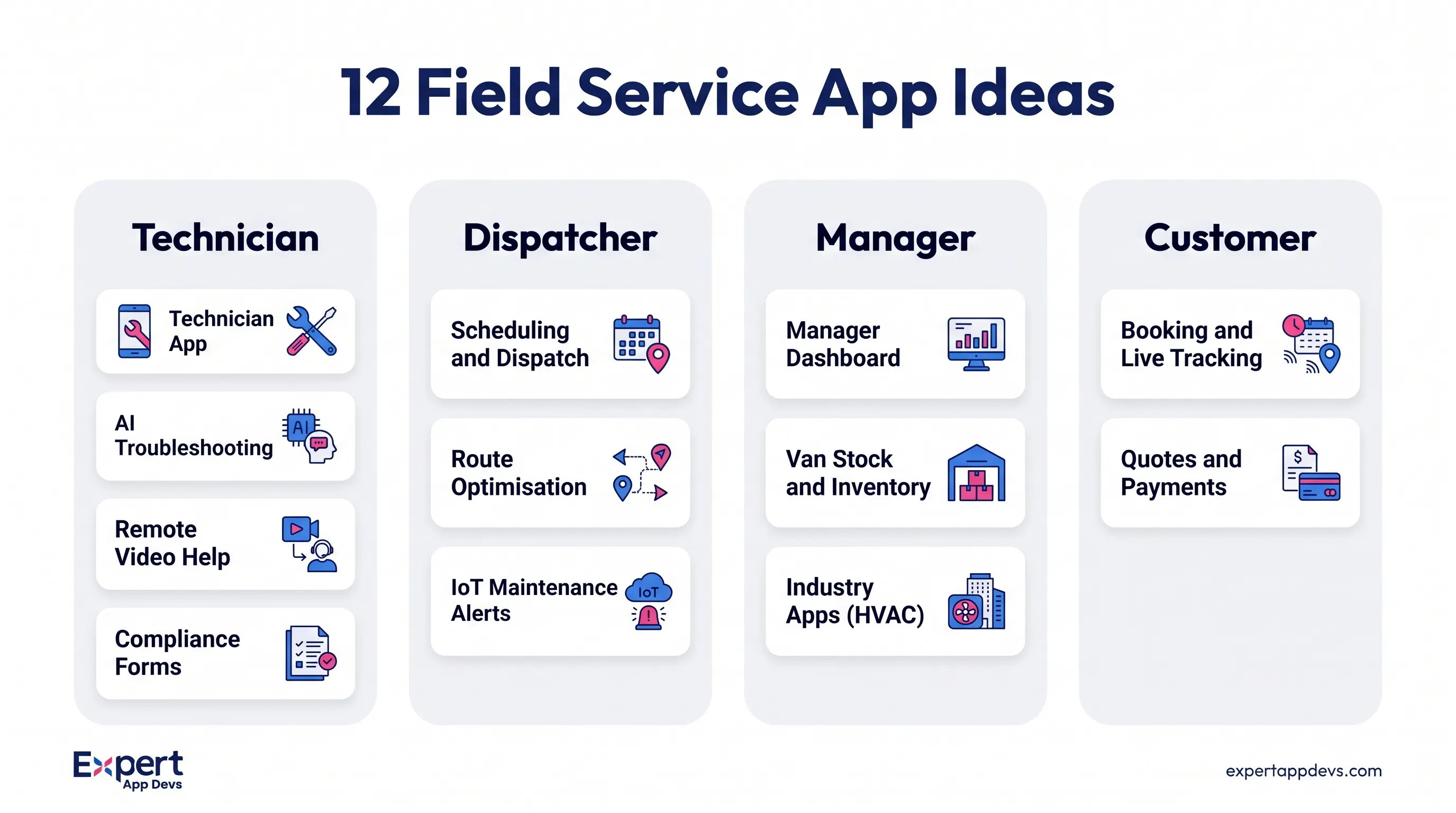
12 Field Service App Development Ideas
1. Technician Mobile App
The core of any field service system. Technicians see today's jobs, customer and asset history, checklists, manuals and parts, then capture photos, readings, notes and the customer's signature. It must work fully offline and sync safely when the signal returns, because basements, plant rooms and rural sites rarely have good coverage.
2. Field Service Scheduling and Dispatch App
Dispatchers assign jobs on a drag and drop board, while the system suggests the best technician based on skills, location, parts on the van, working hours and the customer's service level agreement. AI can re plan the day when a job overruns or an urgent call comes in, and push changes to technicians instantly.
3. Route Optimisation App
Plans the order of stops to cut driving time and fuel, and re routes around traffic during the day. Our AI route planner MVP optimises 50+ stops live and re routes automatically based on traffic, with tracking and analytics. The same approach applies to technician rounds.
4. Customer Booking and Live Tracking App
Customers book a visit, choose a time window, see the technician's arrival on a map, approve quotes and pay, much like a ride hailing app. This cuts "where is the engineer?" calls. We built an on demand car service app with instant booking, live tracking, upfront pricing and IoT based maintenance, and a handyman booking app for home services.
5. Van Stock and Inventory App
Tracks parts on each van and in each warehouse, scans parts in and out with barcodes, and reorders automatically when stock is low. Knowing which van holds a part lets dispatch send the right technician the first time, which directly helps first time fix rates.
6. On Site Quotes, Invoicing and Payments
Technicians build a quote from a price book, get the customer's approval on the tablet, and take payment on the spot. Invoices sync to accounting. This shortens the time between finishing the job and getting paid from weeks to minutes.
7. Remote Video Assistance
A junior technician starts a video call from the job, and a senior expert sees the equipment through the phone camera and draws on the screen to guide the repair. In the Field Service Insights survey, 75% of leaders reported an 11% to 30% improvement in first time fix rates from remote diagnostic and assistance technologies.
Source: Field Service Insights, sponsored by Geotab, The 2025 State of Field Service Report. Self reported by 100 leaders.
8. AI Troubleshooting Assistant
An assistant inside the technician app that answers questions from your own manuals, service bulletins and past job notes: "Error E47 on a model X boiler, what fixed it last time?" It must answer only from approved sources, show where each answer came from, and never replace safety procedures. Our AI development team builds these on your own documents.
9. IoT Based Predictive Maintenance Alerts
Connected equipment sends readings such as temperature, pressure or run hours. When a reading drifts, the system creates a job before the machine fails, and the technician arrives with the right part. We have built IoT apps such as a smart IoT vehicle wash app with automated billing, which the client reports reduced staff workload by 40%.
10. Field Service Manager App
A mobile dashboard for managers: jobs completed, first time fix rate, time on site, overdue jobs, SLA risks and technician utilisation. Managers can approve overtime, reassign jobs and review quality checks from anywhere.
11. HVAC Field Service App and Other Industry Apps
Generic FSM tools often miss industry details. An HVAC field service app, for example, needs equipment and refrigerant records where regulations require them, maintenance agreement visits generated automatically, seasonal demand planning, and good, better, best quote options on site. Similar industry apps make sense for elevators, fire safety, medical equipment, solar, telecoms and facilities management, each with its own checklists and compliance records.
12. Compliance, Safety and Inspection Forms
Digital forms for risk assessments, gas or electrical safety checks, permits and inspection certificates, with mandatory fields, photos, signatures and automatic PDF certificates emailed to the customer. Audit trails show who did what and when.
Must Have Features in a Field Service Mobile App
| User | Must have features |
|---|---|
| Technician | Job list, offline mode, navigation, asset history, checklists, photos, signatures, parts used, time tracking |
| Dispatcher | Scheduling board, skills matching, live technician map, SLA alerts, automatic re planning |
| Manager | Dashboards, first time fix rate, utilisation, approvals, reports |
| Customer | Booking, arrival tracking, quote approval, payment, service history |
| Back office | Invoicing, inventory, contracts, integrations with ERP, CRM and accounting |
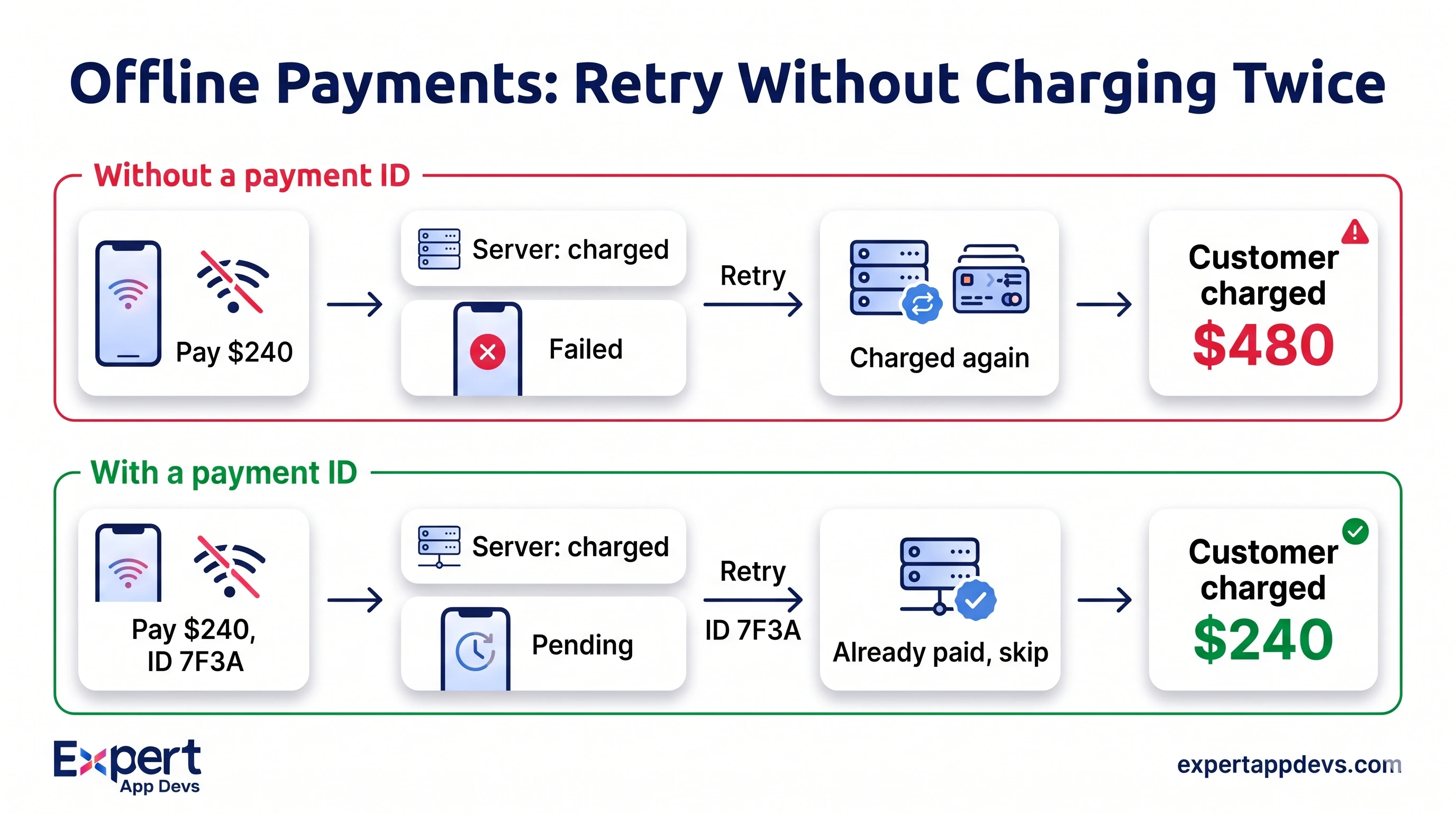
A Real Pattern to Design For: The Double Payment
A technician takes a card payment in a basement. The payment goes through, but the confirmation never reaches the app because the signal drops. The app shows "failed", the technician tries again, and the customer is charged twice. The office spends days on refunds and the customer loses trust.
The fix is to give every payment and every job update a unique ID created on the phone (an idempotency key), so the server recognises a retry and does not process it twice. The app should also show "pending" instead of "failed" when it cannot confirm. For more on offline design, see the offline first section of our enterprise mobility trends guide.
Field Service App Review Checklist
- Can a technician complete a full job with no signal, including signature and photos?
- Are payments, job closures and stock movements safe to retry without duplicates?
- What happens when dispatch changes a job the technician has already started offline?
- Is customer data on the device encrypted and removed when a technician leaves?
- Do location tracking rules respect working hours and local privacy law?
- Can the app run a full day on one battery charge with GPS on?
Should You Buy a Field Service Management App or Build One?
Packaged tools such as Jobber, ServiceTitan, Salesforce Field Service and Microsoft Dynamics 365 Field Service cover standard needs well, and small teams should usually start there. A custom build or a custom layer makes sense when:
- Your workflow, compliance or equipment data is specific to your industry.
- You need deep integration with your own ERP, IoT platform or customer apps.
- Per technician licences become expensive as you grow.
- You want to sell field service software to others.
| Situation | Buy | Build | Hybrid |
|---|---|---|---|
| Small team, standard jobs | Yes | ||
| Strict industry compliance and custom forms | Yes | Yes, packaged core plus custom forms app | |
| Branded customer booking and tracking | Yes | Yes, custom customer app on a packaged FSM API | |
| IoT driven maintenance | Yes | Yes, IoT layer feeding a packaged FSM | |
| Hundreds of technicians | Often, once licences pass build cost | Yes | |
| You sell FSM software to others | Yes |
Hypothetical Worked Example: Licences vs Custom Build Over 3 Years
This is an illustration, not a quote and not a market average. FSM prices vary widely by vendor and plan. Replace each assumption with real quotes.
Scope assumed: technician app, scheduling and dispatch, customer tracking, quotes and payments, inventory and two integrations (accounting and CRM). Packaged FSM assumed at $150 per technician per month plus $30,000 for setup and integration. Custom build assumed at 7 roles for 6 months, then 2 roles for support for the remaining 30 months, at a blended $4,000 per role per month, plus hosting.
| Item (3 years) | 60 technicians | 250 technicians |
|---|---|---|
| Packaged FSM licences | 60 x $150 x 36 = $324,000 | 250 x $150 x 36 = $1,350,000 |
| Packaged setup and integration | $30,000 | $30,000 |
| Packaged total | $354,000 | $1,380,000 |
| Custom build (7 roles x 6 months) | $168,000 | $168,000 |
| Custom support (2 roles x 30 months) | $240,000 | $240,000 |
| Hosting (36 months) | $1,000 a month = $36,000 | $2,000 a month = $72,000 |
| Custom total | $444,000 | $480,000 |
In this example, buying is cheaper for 60 technicians, and building costs about a third as much for 250. The hybrid route (a packaged FSM core plus a custom technician or customer app) often sits in between and reduces risk. Read our guide on app development cost for what drives build budgets.
Recommended Tech Stack and Timeline
- Mobile: Flutter or React Native for one technician app on Android and iOS, with a local database for offline work.
- Web portal: React or Angular for dispatch, managers and back office.
- Backend: Node.js, Laravel or .NET, with PostgreSQL or MySQL and a job queue for syncing and notifications.
- Maps and routing: Google Maps Platform or Mapbox, plus a routing engine.
- Integrations: accounting, CRM, ERP and payment gateways through APIs and webhooks.
- AI and IoT: scheduling optimisation, a document assistant, and an IoT platform for connected equipment.
A focused first version (technician app, dispatch board and customer notifications) typically takes four to six months. Payments, inventory, IoT and AI features are usually added in later releases.
How Expert App Devs Builds Field Service Apps
- Routing: an AI route planner MVP that optimises 50+ stops live and re routes on traffic.
- Field operations: a furniture delivery app for UK and USA operations with AI route optimisation, real time tracking and dashboards for each role.
- Customer booking: car service and handyman booking apps with live tracking.
- Attendance for mobile teams: an AI attendance app with GPS geofencing for outdoor teams, reporting 99.3% accuracy.
- Ownership: you own the code, and we sign NDAs before work starts.
Planning a field service app? Tell us about your technicians, jobs and systems, and we will help you decide what to buy, what to build and where to start.
Frequently Asked Questions
What is a field service management app?
It is software that schedules, dispatches and tracks work at customer sites. It usually includes a technician mobile app, a dispatch and manager portal, and often a customer app for booking and tracking.
What features should a field service mobile app have?
Offline job details, navigation, asset history, checklists, photos, signatures, parts used, time tracking, and safe syncing. Quotes, payments and AI assistance are common next steps.
What is the best field service scheduling app?
It depends on team size and complexity. Packaged FSM tools suit standard scheduling. Custom or hybrid apps suit complex skills matching, SLAs or integration with your own systems.
How much does it cost to build a field service app?
It depends on features, integrations and platforms. Compare the build and support cost with per technician licence costs over three years, as in the worked example above, using real quotes.
Do field service apps work offline?
Good ones do. They store jobs and forms on the device, queue changes, and sync them safely when the connection returns, without duplicate payments or lost updates.
Can a field service app integrate with ERP and accounting software?
Yes. Jobs, parts, invoices and payments can sync with ERP, CRM and accounting systems through APIs, so the office does not retype job data.
Conclusion
The right field service app is the one that fixes your biggest leak: wasted driving, return visits, slow invoicing or paperwork. Start with the technician app and scheduling, design for no signal from day one, and decide honestly whether a packaged tool, a custom build or a hybrid fits your scale and workflows.






 467

 0


 444
0
 616
0
 447
0