



- Key Takeaways
- How Has the Software Development Decision Changed?
- Build, Buy or Partner: Which Option Fits Your Project?
- When Building Internally With AI Makes Sense?
- When an External Engineering Team Makes Sense?
- Internal AI Development vs External App Development
- When Is a Hybrid Engineering Model a Good Choice?
- How Much Does AI Actually Change Development Cost?
- What Should You Check Before Releasing AI-Assisted Software?
- What Does Enterprise AI Code Governance Look Like?
- A CTO's Checklist for Choosing the Right Development Approach
- How to Make the Final Decision?
- How Expert App Devs Can Help You Build and Grow Your Application?
- Wrap-up
- Frequently Asked Questions
Ready to transform your vision into reality?
Get Started
Build In-House With Cursor, Copilot, and AI Agents or Hire an External Engineering Team?
 27
27
 0
29 Oct 2026
29 Min Read
0
29 Oct 2026
29 Min Read


 Share
Share

 Download PDF
AI coding tools like Cursor and GitHub Copilot can help developers write code faster, but they do not automatically reduce the total cost of software development. Businesses must also consider developer salaries, AI subscriptions, testing, security, infrastructure, and ongoing maintenance. The right approach depends on your budget, project complexity, available skills and long-term goals. Compare in-house development with AI, an external engineering team, and a hybrid model to understand which option best fits your business.
Key Takeaways
- AI coding tools speed up tasks, but people still own architecture, security and releases.
- Build in-house with AI only if your team has the skills and the time.
- An external team fills skill gaps and adds capacity when deadlines are tight.
- A hybrid model keeps product ownership inside while adding outside engineering support.
- Set clear rules for reviewing AI-generated code before anything reaches production.
AI is becoming a regular part of software development. According to Stack Overflow's 2026 Developer Survey, 66% of developers who use AI tools use AI coding agents, while 63% use general-purpose AI chat tools. Over 26.2% use automated agent workflows. These figures show how widely AI tools are being adopted and used in software development, but do AI tools make development easier, or do you still need external engineering support? Developers still need to check AI-generated output before using it. The same research says only 6.6% of developers trust AI tools for important decisions, and 78.7% rate knowing where AI-generated answers come from as important or very important.
For CTOs and product leaders, this raises a practical question: can AI help existing developers write code and build features, or do you still need an external app development team? Because someone still needs to make technical decisions, verify the output, test integrations, manage security, and support the product after launch.
Let's compare in-house vs. outsourced software development with AI options to help you decide which approach makes sense for your business.
How Has the Software Development Decision Changed?
AI has changed the way businesses approach software development. Earlier, businesses mainly had two options for software development: build an application with an in-house team or outsource the work. AI coding tools have added more choices.
Companies can now build with AI using their existing teams, work with an external AI-enabled engineering team, or go for a hybrid model as per convenience. Plus, AI coding assistants like Cursor and GitHub Copilot can generate code, develop features, create UI components, integrate APIs, and do much more development work.
However, you can't rely on these tools completely; you still need to validate functionality, review architecture, test integrations, and plan deployment and maintenance. GitHub's own best practices for using Copilot also advise developers to understand, review and test suggested code before they use it.
Look at the table below to get a better idea of where AI agents can help you in development.
| Capability | AI tools can help with | Human expertise still matters |
|---|---|---|
| Code generation | Yes | Architecture decisions |
| Boilerplate | Yes | System design |
| Unit tests | Yes | Test strategy |
| Debugging | Yes | Complex production issues |
| Refactoring | Yes | Business impact |
| Documentation | Yes | Accuracy and context |
| Prototyping | Strong | Production readiness |
| UI development | Strong | UX decisions |
| API development | Strong | Security and architecture |
| Code review | Assistance | Final engineering ownership |
| Security | Assistance | Enterprise security validation |
| Compliance | Limited | Compliance responsibility |
| Legacy modernization | Assistance | Migration strategy |
| Production delivery | Assistance | Accountability |
Build, Buy or Partner: Which Option Fits Your Project?
The build vs buy vs partner software development decision comes down to how unique your product needs to be and who will own it. Buy ready-made software when a standard tool covers your needs. Build in-house when the product is core to your business and your team has capacity. Partner with an external team when you need skills or speed you do not have.
AI coding tools mainly change the "build" option. They can make an in-house team faster, but they do not remove the need for engineers to design, review and support what gets built.
| Factor | Buy (ready-made software) | Build (in-house team + AI) | Partner (external or hybrid team) |
|---|---|---|---|
| Best when | A standard tool already solves the problem | The product is core to your business and your team has time | You need extra skills, capacity or speed |
| Customization | Limited to what the vendor offers | Full | Full, based on your requirements |
| Time to start | Fast | Depends on team availability | Depends on partner selection and onboarding |
| Ownership of code | Vendor owns the product | You own it | You own it, if your contract says so |
| Ongoing cost | Subscription or license fees | Salaries, tools, infrastructure and maintenance | Partner fees plus your internal oversight |
| Main risk | Vendor lock-in and feature gaps | Capacity limits and skill gaps | Weak governance or unclear responsibilities |
When Building Internally With AI Makes Sense?
Building an application in-house with AI tools like Cursor and GitHub Copilot is a good choice, but only if you have the right people and skills. Building with AI works well when:
- You have an experienced engineering team: Your developers understand the technology and can review, test, and maintain AI-generated code.
- The product relies on internal knowledge: Your team understands your business processes, customer needs, and proprietary systems better than anyone else.
- The workload is manageable: Your existing team has enough time to build the application without delaying other important projects.
- Your team controls the architecture: Your engineers can make key technical decisions and ensure the application fits your existing systems.
- Security requires internal control: Your business needs close control over its code, data, and development process.
- You don't need to expand quickly: The project can be completed with your current team's capacity.
Here, AI can help you work more efficiently, but you still need skills to check the results and be sure.
When an External Engineering Team Makes Sense?
When your internal team doesn't have time, people, or technical skills to handle a project, hiring an external team can be the best investment to balance work.
Consider an external team when:
- Building a new product: You need support across planning, UI/UX, application development, testing, and launch. Our guide on the pros and cons of outsourcing MVP development explains what to expect.
- Modernizing an existing application: Your internal team needs help updating architecture, technology, integrations, or user experience.
- Building an AI application: You need relevant AI engineering expertise alongside application development skills.
- Accelerating releases: Your team has a roadmap but lacks the capacity to deliver features on schedule.
- Integrating enterprise systems: The application must work with existing platforms, APIs, databases, or business workflows.
- Addressing skill gaps: You need expertise your team doesn't currently have. IT staff augmentation lets you add these skills to your existing team without permanent hiring.
- Managing long-term application needs: You need a partner that can support enhancements, testing, maintenance, and future releases, such as a dedicated development team.
Internal AI Development vs External App Development
| Decision factor | Internal team + AI | External app development team | Hybrid model |
|---|---|---|---|
| Existing business knowledge | Usually strong | Needs time to learn your business | Combines internal knowledge with external expertise |
| Initial setup | Uses your existing team and tools | Requires partner selection and onboarding | Requires coordination between both teams |
| Development capacity | Depends on your team's availability | Adds development capacity | Combines internal and external resources |
| Specialized expertise | Depends on your team's skills | Can provide additional technical skills | Accesses both teams' expertise |
| Product ownership | Managed internally | Depends on the agreement | Can remain with your internal team |
| Security and governance | Managed internally | Requires agreed security controls and oversight | Responsibilities are shared |
| Ongoing maintenance | Handled internally | Depends on the engagement | Responsibilities can be divided |
| Best fit if | Team is skilled with enough capacity | To fill skills gaps or development capacity | Internal ownership with additional support |
Though the right choice depends on your project's needs, budget, timeline, and available skills. If you are looking for the option that gives you the benefit of both internal and external teams, then you can go for a hybrid model.
When Is a Hybrid Engineering Model a Good Choice?
A hybrid engineering model can be a good choice when you want to keep control of your product but need extra support to build, improve, or maintain it. Instead of handling everything internally or handing the entire project to an external company, you can combine your team's business knowledge with an external team's technical skills.
In short, you decide where you need support and what kind of support you need.
Your internal team can focus on:
- Product strategy: Decide what to build and which business goals to prioritize.
- Architecture ownership: Make key technical decisions and ensure the application fits your long-term plans.
- Business requirements: Share customer needs, internal processes, and project priorities.
- Product management: Manage the roadmap, set priorities, and track progress.
An external engineering team can support in things such as:
- Development: Build new features and applications.
- QA and testing: Check that the application works as expected, with support from dedicated QA engineers.
- UI/UX design: Create user-friendly interfaces and experiences.
- DevOps and cloud: Support deployment, infrastructure, and application performance through DevOps and cloud engineering.
- AI engineering: Build AI-powered features and integrate suitable AI tools.
- Specialized engineering: Provide skills your internal team may not have.
- Legacy modernization: Update older applications and move them toward newer technologies. Learn more about legacy application modernization.
Many teams organize this support as small cross-functional pods. Our guide on building agile pods for outsourced product ownership explains how this works in practice.
How Much Does AI Actually Change Development Cost?
AI tools like Cursor and GitHub Copilot can help you write code faster, automate repetitive tasks, and find potential issues. But this does not mean lower overall development costs. The total cost also depends on the people, tools, and processes needed to deliver and maintain the application.
Costs of Building In-House With AI
Building an application internally involves more than paying for AI tools. You need to calculate developer salaries, hiring, training, and management.
Also consider AI subscriptions and usage fees. If the tool is new, your team may need time to review AI-generated code, fix errors, test features, and check security. You also need to think about infrastructure, deployment, updates, and ongoing maintenance.
If any employees leave in the middle of development, hiring replacements and transferring their knowledge will add extra cost.
Hence, AI may help you reduce time on some tasks, but the overall savings will depend on how your team uses it.
Costs of Working With an External Engineering Team
When you hire an external engineering team, your costs usually depend on the services and level of support your project requires, such as application development, architecture planning, quality assurance, and project management.
You will also have to pay for cloud infrastructure, software tools, or other project-related expenses, depending on your agreement. Communication, onboarding, and coordinating with your internal team also require time and effort.
The final cost depends on the team's expertise, project scope, engagement model, and ongoing support requirements. For a closer look at pricing models and replacement terms, read hire dedicated developers: pricing, risk, and replacement explained.
Total Cost of Engineering Ownership: What to Compare
To compare options fairly, look at the total cost of engineering ownership for the same scope, timeline and support period. AI tool fees are usually a small line item. People, review time and maintenance tend to drive the real cost.
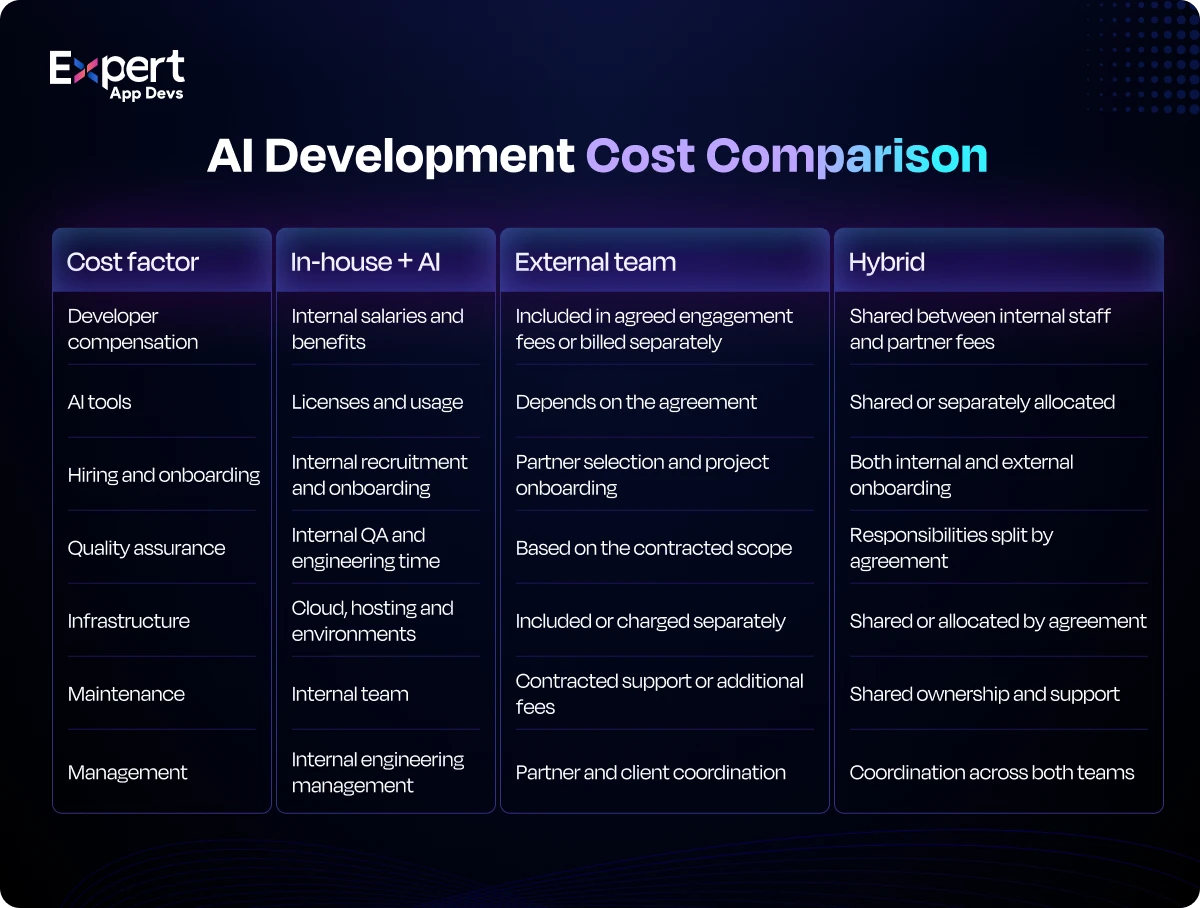
| Cost item | In-house team + AI | External engineering team | Hybrid model |
|---|---|---|---|
| People | Salaries, benefits, hiring and training | Partner fees for the agreed roles | Internal leads plus partner fees |
| AI tools | Seats and usage fees for your team | Often included or agreed in the contract | Split by team |
| Review and testing time | Your engineers' time | Partner QA plus your acceptance testing | Shared by both teams |
| Management | Your managers and leads | Partner project management plus your oversight | Your product owner plus partner leads |
| Infrastructure | Your cloud and tooling costs | Depends on the agreement | Usually on your accounts |
| Staff turnover | Rehiring and knowledge transfer | Partner replaces, if the contract says so | Risk is spread across both teams |
| Maintenance after launch | Your team's ongoing time | Support agreement or retainer | Divided by agreement |
Usage costs for AI tools are also something teams now manage actively. In Stack Overflow's 2026 survey, 38% of respondents said their organizations set usage limits on AI tools.
What Should You Check Before Releasing AI-Assisted Software?
If you have built software using AI, you must check certain things before delivering the software to the client.
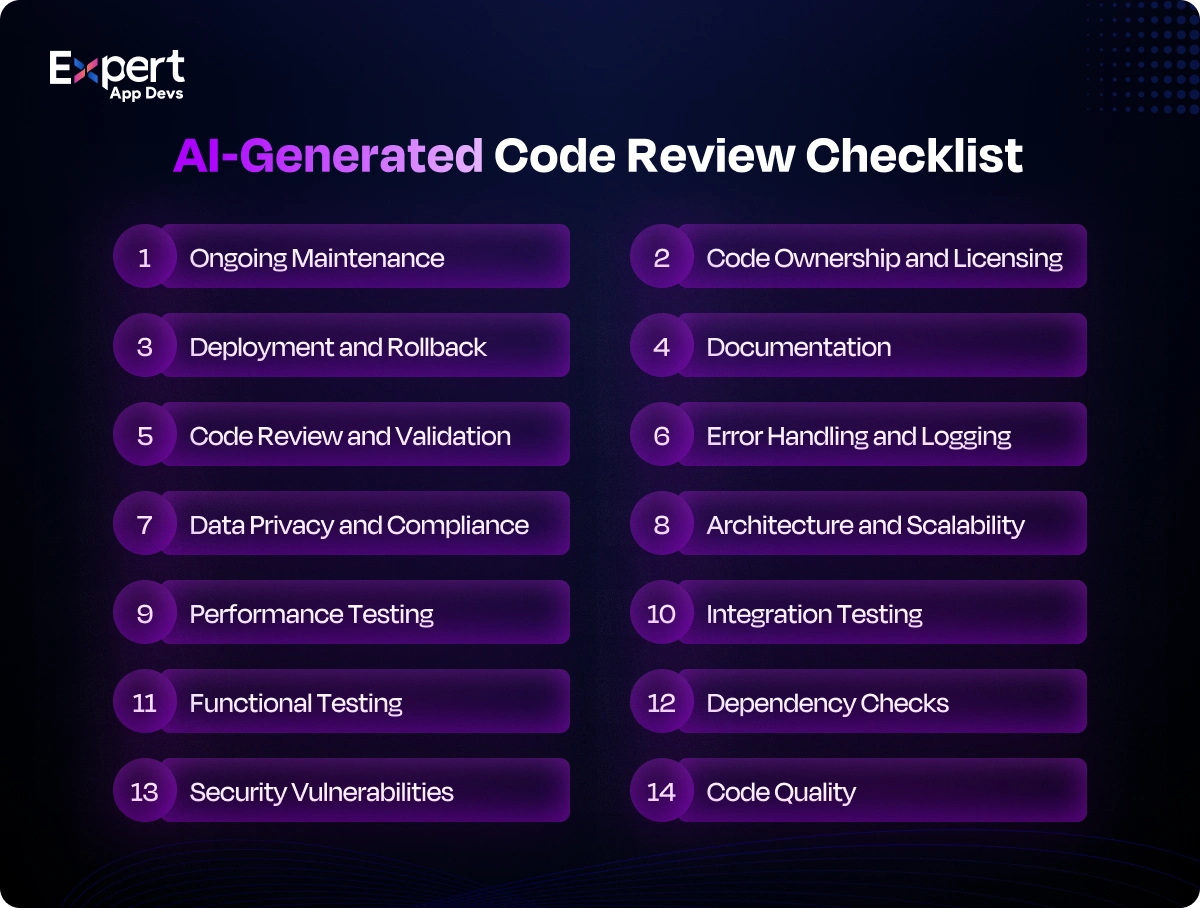
Code quality and maintainability
Start by checking code quality and maintainability. The code should be easy to understand, update, and improve.
Application security and dependency vulnerabilities
Check the application for security weaknesses and outdated third-party libraries. Fix known vulnerabilities before launch to reduce the risk of data breaches, attacks, and unauthorized access.
Data privacy and handling of sensitive information
Make sure the application collects, stores, and uses customer and business data safely. Limit access to sensitive information and follow relevant data protection laws and company policies.
Functional, integration, regression, and performance testing
Test whether features work correctly, systems connect properly, existing functions remain stable after changes, and the application handles expected user traffic without becoming slow or unreliable.
API reliability and compatibility with existing systems
Check that APIs exchange data correctly, handle errors properly, and work with your existing software. This prevents connection issues, data mismatches, and disruptions in your business operations.
Infrastructure, deployment, monitoring, and recovery
Make sure the application has suitable infrastructure, a reliable release process, and monitoring to detect problems. Prepare backups and recovery plans to restore services if something goes wrong.
Documentation, access controls, and ongoing ownership
Keep clear documentation about how the application works and how to maintain it. Set appropriate user permissions and define who handles updates, fixes, security, and long-term support.
What Does Enterprise AI Code Governance Look Like?
Enterprise AI code governance is the set of rules that decides which AI tools your team may use, what data those tools can see, and how AI-generated code is reviewed before release. It applies to your internal team and to any external team working on your code.
A practical policy usually covers these points:
- Approved tools and accounts: Allow only approved AI tools, used through company accounts rather than personal ones.
- Data and training settings: Check how each tool handles your code. For example, Cursor's Privacy Mode keeps your code from being used for model training, and admins can enforce it for the whole team.
- Public code matching: GitHub Copilot lets organizations decide whether to allow suggestions that match public code, and its code referencing feature shows where matching code comes from and its license.
- Human review: Every AI-assisted change goes through normal pull request review by a qualified engineer.
- Automated checks: Run code scanning, dependency scanning and secret scanning in your build pipeline.
- A secure development standard: Many teams map their process to the NIST Secure Software Development Framework.
- Rules for external teams: Your contract should state which AI tools the partner may use on your code, how your data is handled, and who owns the code. Our guide on how to choose an IT staff augmentation company covers the contract terms to agree before work starts.
A CTO's Checklist for Choosing the Right Development Approach
Before deciding on build vs buy vs partner software development, consider these questions:
- Do we have the right technical skills? Check whether your team can build the application and work with the required technologies.
- Can we meet the deadline? Make sure your developers have enough time to complete the project.
- Can we manage the entire development process? Consider whether your team can handle architecture, security, testing, deployment, and future updates.
- Can we maintain the application after launch? Plan for bug fixes, security updates, new features, and ongoing technical support.
- Do we need specialized expertise? Identify any skills your team lacks, such as AI engineering, cloud development, or enterprise app modernization.
- What will the total cost be? Compare salaries, AI tools, hiring, external team fees, testing, infrastructure, and maintenance.
- Who reviews AI-generated code and owns it? Decide who will review and own the code and make technical decisions.
- Which tasks can an external team handle? Identify areas where outside support can reduce pressure on your team.
- Can we start small? You should always start with small work before committing to large projects. For example, a 40 hour trial with one developer lets you test the fit on real tasks.
- What expectations should we agree on? Define delivery timelines, quality standards, security requirements, responsibilities, and code ownership before development begins.
How to Make the Final Decision?
Consider these quick points to decide if you are confused between in-house vs outsourced software development with AI.
- Build internally with AI if your team has the skills, time, and resources to deliver and maintain the application.
- Hire an external engineering team if you lack the expertise or capacity to meet your goals.
- Choose a hybrid software development model if you want to retain product ownership and get outside help for development or specialized tasks.
The best approach is the one that fits your business needs, budget, timeline, and long-term plans. If you decide to bring in outside support, choose an enterprise software development company that matches those same needs.
How Expert App Devs Can Help You Build and Grow Your Application?
Get the right engineering expertise for your AI application with Expert App Devs. Depending on your project, we provide software developers, AI engineers, architects, QA specialists, UI/UX designers, and DevOps engineers. As an experienced AI software development partner, our team uses AI-assisted workflows and well-established engineering practices to develop features, integrate models and APIs, test application behavior, and support deployment.
Whether you need to build a new product or enhance your existing platform with AI, hire AI engineers to build features and AI functionalities as per your needs that are secure and ready for real-world use.
Wrap-up
AI tools are changing how applications are developed, but they don't remove the need for experienced engineers. Your business still needs people who can make architecture decisions, review code, manage security risks, test integrations, and prepare software for production.
Use AI to improve development speed where it makes sense. Decide when to outsource software development or take help of an external engineering team. Start by identifying your team's strengths and gaps. Then choose the development model that gives you the right balance of control, expertise, capacity, and long-term support.
Not sure which model fits your project? Talk to our experts.
Frequently Asked Questions
Can Cursor replace software developers?
Cursor can help developers write, edit, understand and debug code. However, production software still requires people to define requirements, make architecture decisions, validate functionality, review security and maintain the application.
Can GitHub Copilot replace a development team?
GitHub Copilot can assist with coding and other development tasks, but it does not automatically replace the skills and responsibilities needed to deliver a complete software product. The level of human involvement depends on the project and its risks.
Can AI coding agents build production-ready applications?
AI coding agents can help build application features, but their output must be tested and reviewed. Production readiness depends on code quality, security, integration testing, performance, deployment controls and ongoing maintenance.
Is AI-generated code secure?
Not automatically. AI-generated code can contain bugs, insecure patterns or vulnerable dependencies. Teams should review the code, run suitable security checks, test the application and follow their organization's security policies.
Is in-house development cheaper than outsourcing?
Not always. In-house development involves salaries, recruitment, tools, management, infrastructure and maintenance. Outsourcing involves partner fees and coordination costs. Compare the total cost of ownership for the same scope, timeline and support requirements.
When should a company choose a hybrid software development model?
A hybrid model is useful when a company wants to retain product strategy and technical oversight while adding external development capacity or specialized skills. Clear ownership, communication and security responsibilities are important.
Is hybrid software development better than outsourcing?
It depends on how much control you need. Full outsourcing suits projects with a clear, fixed scope that a partner can deliver end to end. A hybrid model suits products you want to own and keep improving, because your team keeps the roadmap and architecture while the partner adds capacity and skills.
Who should review AI-generated code?
Qualified engineers should review AI-generated code based on the application's complexity and risk. Security specialists, QA engineers and architects may also need to review relevant parts before release.
Should businesses hire developers if AI can generate code?
Yes, when the business needs engineering judgment, reliable integrations, security, testing, accountability and long-term product support. AI tools can support those developers and help them complete suitable tasks more efficiently.





 101
101

 3
3


