


- What Is an Android App?
- Key Features Commonly Used in Android Apps
- Core Factors That Influence the Cost of Development
- Modular Cost Breakdown for AI App Components
- Total Estimated Cost to Develop an Android App in India
- AI Tech Stack Used to Build Android Apps
- Development Timeline for an Android App
- Cost Comparison: India vs. Global Counterparts
- Why Outsource to India?
- How to Choose the Right Android App Development Partner in India?
- The AI-Ops Methodology of Expert Indian Developers
- Real-World Use Cases of AI-Based Android Apps
- Final Verdict: Is India the Best Place to Build Android App?
- Frequently Asked Questions for Android App Development Costs
Ready to transform your vision into reality?
Get Started
How Much Does It Cost to Develop an AI-Based Android App in India?
 146
146
 3
05 Dec 2025
45 Min Read
3
05 Dec 2025
45 Min Read


 Share
Share

 Download PDF
How would you feel if your next Android application could anticipate your user’s next move? From hyper-personalized recommendations to conversational intelligence and real-time vision recognition, AI-based Android apps are setting the new benchmark for intelligence.
Globally, companies are turning to India not just for cost advantages it offers, but also the access you get to the most skilled AI developer ecosystems worldwide. With 52% of the global smartphone users now preferring in-built AI features, the market indicates a strong user base ready to adopt AI apps.
India has become the strategic hub for AI Android app development as they have the skills, value and economic advantage. The typical AI-based Android app can cost anywhere between $25,000 and $120,000 in India. The final AI-based Android app development cost depends on the complexity, custom model requirements and scalability needs.
This guide will take you through the actual cost of AI-based Android app development along with timelines to help make informed decisions.
What Is an Android App?
Consider this, your Android app doesn’t just respond to your inputs; it reasons. For instance, it can predict delays in your travel and help reroute to avoid disruptions. That’s what an AI-based Android app does. The software is powered by models that can learn from your user’s behaviour, understand the context and deliver intelligent & personalized actionable recommendations.
Most apps follow three main architectural types.
- The Wrapper apps embrace the thin-client APIs, such as generative AI endpoints. They are great for fast launches using CAPEX. However, if you use token-based OPEX, it can scale easily.
- Hybrid or RAG-driven apps (Retrieval-Augmented Generation system) are the next architectural app type. They combine on-device logic with retrieval systems to deliver smart and contextual output. However, they may need upfront data engineering that requires resources.
- Lastly, there are the Edge AI apps that allow you to run models on the device directly, offering better speed, and privacy. The marginal cost per user is less but, you will need to pay higher upfront costs to complete the build.
AI offers real-time vision scanners, voice interfaces, predictive analytics and recommendation engines for all these app types. So, when should you invest in an AI-based Android application? When personalization, automation and efficiency are a competitive advantage to your business, you should start thinking of AI-backed application development.
Key Features Commonly Used in Android Apps
Once you understand the architecture of AI apps, your next step should be deciding what intelligence you aim to add to your application. The features that will help give you a competitive edge will also help gain clarity on timelines, engineering complexity and cost. Here are all the AI capabilities that typically shape your development roadmap.
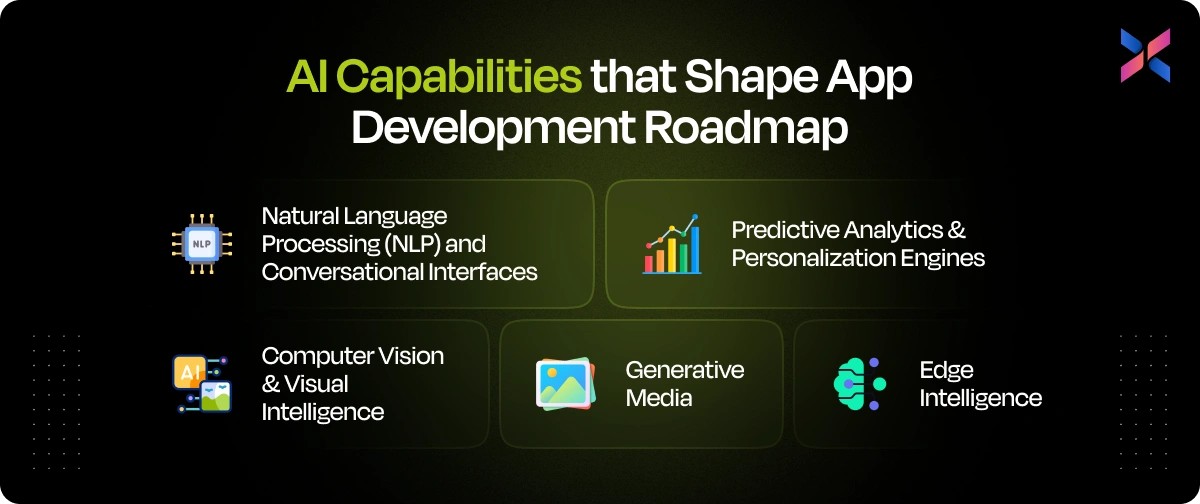
#1. Natural Language Processing (NLP) and Conversational Interfaces
NLP is the backbone of your Android AI app, especially when you need to implement chat, search and language capabilities. With features like semantic search, real-time translation and context-aware chatbots, you can improve user engagement. However, the accuracy of your outcome depends on the model size and training data. As the model size increases, the inference costs and tuning needs grow.
#2. Computer Vision & Visual Intelligence
Vision models can bring the real-world awareness into your app through features like scanning documents with OCR, facial authentication and visual search. They are powerful and compute-heavy. This may influence your architecture choice, whether you want to go with cloud inference or on-device computing.
#3. Predictive Analytics & Personalization Engines
You can predict user needs with recommendation engines, churn prediction and dynamic pricing. These features rely on high-quality historical data. If the prediction logic is granular, your data engineering team will need to put in more work into data cleaning and management upfront.
#4. Generative Media
Generative models can help your app create images, synthetic voices and personalized media. However, if you use self-hosting, you might need to consider token-based API and CAPEX costs.
#5. Edge Intelligence
This is the perfect feature for privacy-first apps. With on-device inference, you can ensure fast AI features devoid of cloud dependency. The trade-off in this case would be increased development complexity with higher investment.
These features can help you improve your user experience. Understanding these features can help you plan your budget, scalability and long-term finances.
Core Factors That Influence the Cost of Development
After understanding the features, it is important to dive deep into the costs. So, what factors affect the AI-based android app development pricing? Knowing the cost drivers can help stay in control of the timeline and trade-offs, ensuring high-quality solutions. Let’s break down these cost factors for you to help make informed decisions.
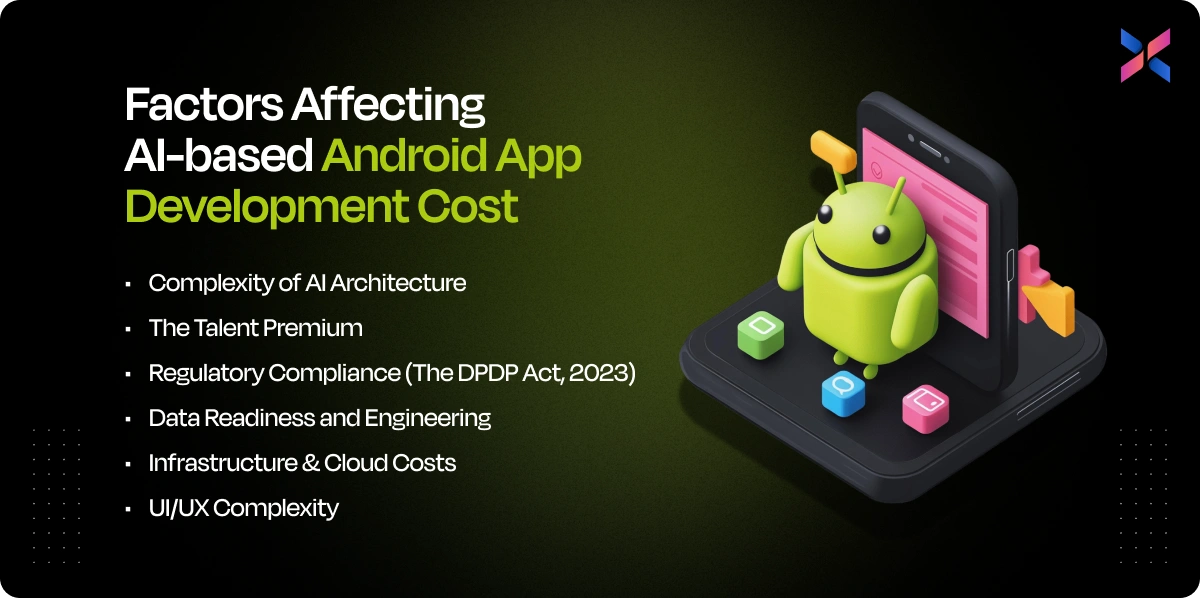
#1. Complexity of AI Architecture
This is your biggest cost-defining component. If you go with API-only integrations, it will keep the costs affordable, as you are renting intelligence in this case. Your costs increase with fine-tuned models as you must invest in dataset preparation and training cycles.
Custom on-device models require heavy engineering and high-level optimization, making them very expensive and most scalable in long term.
#2. The Talent Premium
All developers don’t bring the same skill depth to your team. A generalist Android developer charges anywhere between $18 and $35 per hour, while the specialized AI engineer will charge from $30 to $60+. This is because the latter brings their expertise in model tuning, inference optimization and architectures to the development scenario. If you want to build advanced features, your talent cost will increase.
#3. Data Readiness and Engineering
A good 15 to 25% of your total budget will go into assessing the data availability, cleaning noisy datasets and building pipelines. If you work with poor data quality, it can lead to inflated AI costs, which most teams underestimate.
#4. Infrastructure & Cloud Costs
Vector databases, token consumption and even GPU compute can add costs, especially when apps start hitting high query volumes. That’s where the architecture plays a pivotal role. It will determine how much you are likely to spend in a month.
#5. Regulatory Compliance (The DPDP Act, 2023)
There are laws like the Digital Personal Data Protection Act, 2023, which introduce mandatory expenses for aspects like periodic data audits and consent management. You should consider setting aside 10 to 15% of the total project cost, which is non-negotiable.
#6. UI/UX Complexity
You need more iterations, logic and states to design adaptive Gen AI elements into your application. This will automatically increase the design and development hours.
How to reduce AI app development costs?
There are multiple ways in which you can reduce android app development costs and ensure better budget. Start app development with API-based features. Validate the demand for the app early and avoid over-engineering your models. To keep the costs well-maintained, you should also invest in clean datasets from the beginning.
Reusing pre-trained models and building modular components can also help keep the infrastructure lean and costs affordable.
Modular Cost Breakdown for AI App Components
The average cost of AI-based Android app development in India is about $25,000 to $120,000+, depending on architecture, data complexity and feature depth you have planned.
Let’s break the entire app development project into modules to understand where your total budget will go. This will help you plan your finances intelligently and effectively.
#1. AI Model Development & Engineering
This is the point where you will build intelligence into your app. If you add only basic prompt engineering and API integrations, the cost will be affordable, anywhere between $1,50 and $5,000. If you are setting up a RAG pipeline, integration embeddings or fine-tuning the model, it will cost between $8,000 and $25,000.
In case of custom training and Edge AI optimization, the budget can automatically exceed $30,000+. This is especially more if you optimize the app for on-device inference.
#2. Data Engineering & Preparation
Your data for models does not come clean. You will be collecting raw data that you can run through ETL pipelines and then annotate. This would cost you around $4,000 and $15,000, depending on the volume. If your app needs domain-specific labeling, human annotation can increase costs automatically.
#3. Backend & Infrastructure
You need vector storage along with scaling logic and endpoints for developing the backend. The cost of setting up APIs, vector databases and secure cloud architecture costs between $5,000 and $18,000. This will depend on whether you are using managed services or self-hosted setups like Google Cloud or Amazon Web Services.
#4. Mobile Application Development
UI/UX design, Android frontend work and integration with AI pipelines are crucial for mobile app development. To deliver a production-quality Android app, you will need to budget anywhere between $7,000 and $25,000. If you need multi-state generative UI or offline intelligent features, you will note an increase in the costs.
#5. Operational Costs (Recurring)
LLM API usage via providers like OpenAI and Google Gemini can cost between $50 and $2,000 per month based on your usage. In case you are using services like Pinecone or Weaviate, it will cost between $30 and $300 per month. The observability tools will cost between $50 and $200 a month.
|
Component |
Typical Cost Range |
|
AI Model Development |
$1,500-$30,000 |
|
Data Engineering |
$4,000 - $15,000 |
|
Backend & Infrastructure |
$5,000 - $18,000 |
|
Mobile App Development |
$7,000 - $25,000 |
|
Recurring Operational Costs |
$50 - $2,500 per month |
Total Estimated Cost to Develop an Android App in India
How much does AI-based Android app development cost in India? A ballpark amount would be between $40,000 and $100,000+. We have seen a component-wise breakdown of the costs. Let’s understand how it translates into real-world budgets. You will know what level of intelligence your app can actually support and the budget you will need to proceed.
Tier 1: The "AI-Enabled" MVP
If you want to test a new idea or validate your idea for market-fit, you must choose this tier. Android app development cost ranges from $25,000 to $45,000 and it takes about 2-3 months to accomplish.
The tier 1 app relies on API-backed intelligence like chatbots, smart search, recommendations and document parsing. The build cycles are faster and architecture lighter. You can avoid model training costs as you would be renting AI to get the product into the market at the earliest.
Tier 2: The "Intelligent" Mid-Market App (RAG)
If you want contextual, domain-aware and precise responses, you should develop the mid-market app. With RAG (Retrieval Augmented Generation), you can add complexity via vector stores, custom pipelines and embeddings.
Typical use cases for the intelligent mid-market app would be fintech advisors or healthcare assistants. The budget is higher as it involves data engineering, backend scaling and deep UX logic. This tier costs about $50,000 to $100,000. It takes about 4-6 months to deliver the app.
Tier 3: The "Enterprise" Custom / Edge AI Solution
If you are planning to develop privacy-first on-device models with custom training and advanced multimodal AI, you should enter this tier. It includes Edge optimization, quantization and GPU training cycles that drive the AI Android app development costs. It includes a series of serious investments but, at the end you get unmatched and long-term efficiency with near-zero-per-user inference cost.
Hidden AI Development Costs
AI-based Android development isn’t a one-time project. You should set aside 15-25% of your budget for annual maintenance. It will cover model retraining, drift recovery, privacy audits and database updates.
Can AI apps be built on a low budget? If you have this question, the short answer is yes. You can start small to keep the budget low. Using API-based workload and limited features that deliver core value, along with pre-trained models, can also help build AI on a low budget.
AI Tech Stack Used to Build Android Apps
Choosing the right AI stack isn’t a technical decision alone; it will shape the development cost, speed, future maintenance bills and even scalability of the application. Each layer of the tech stack contributes differently. Knowing them can help plan better and avoid surprise expenses at a later stage.
#1. Mobile Frameworks
You can use Kotlin for native app development or Flutter to develop across platforms. Kotlin delivers AI Android app that extends top-tier performance, which is useful for AI-heavy use cases like advanced device integrations. However, this will increase the AI Android app development cost.
Flutter will accelerate the development as your development team needs to work on a single codebase for iOS and Android platforms. If your AI logic resides in the backend, Flutter can reduce your development time by 25 to 35%.
#2. On-Device Inference Engines
Most modern AI apps use on-device inference, which reduces cloud bills and enhances responsiveness. You can use tools like LiteRT and MediaPipe to manage lightweight ML tasks. Gemini Nano enables small LLM capabilities on your Android devices. These tools can reduce latency and save about 60% on monthly usage costs. It can accelerate user activity.
#3. The Orchestration Layer (Glue)
You can use frameworks like LangChain and LlamaIndex to store the core AI logic. These tools help with prompting, routing, retrieval and chain execution. As they work with APIs built using FastAPI or Django, it makes integration with mobile apps smooth.
#4. The Knowledge Layer (Databases)
Your AI Android developer will build the search, personalization and RAG pipelines with Pinecone and Weavite. You can store the structured data inside PostgreSQL that is enhanced with pgvector. This stack is designed to keep your AI app’s responses fast, accurate and scalable.
|
Stack Layer |
Typical Monthly/Dev Cost |
Budget Impact |
|
Kotlin (Native) |
20-30% of development cost |
High-performing solutions |
|
Flutter |
Saves 25-35% |
Fast delivery |
|
On-device Engines |
$50 approximately |
Cuts cloud expenses |
|
LangChain/LlamaIndex |
$300 approximately |
Builds core AI logic |
|
Pinecone/Weaviate |
$50 to $600 |
Scales the app |
Development Timeline for an Android App
As a founder, you are now aware of the tech stack that can help finalize the budget. Your next question is how long does it take to develop an AI Android application. It can take anywhere from 5 to 7 months to create real-world projects, depending on data readiness, AI complexity and the polished UI experience you aim to deliver. Here is a realistic timeline for AI-based Android app development.
Phase 1: Discovery & AI Feasibility
In this phase, we will translate your idea into a workable blueprint to be followed. Your teams will collaborate to define user journeys, evaluate technical feasibility and determine whether you need an API-based AI or custom models. You can prevent expensive pivots by investing in this stage. This stage takes up 2 to 3 weeks.
Phase 2: Data Engineering & Preparation
This is also known as the bottleneck phase. With clean, structured and well-labeled data, you can determine if your AI model will be accurate or frustrating. If you underestimate this stage or skip it, you will note that it impacts your model’s performance, cloud costs and user trust. You must invest 3-6 weeks to complete this stage.
Phase 3: Model Development & Experimentation
At this point, you will be building the AI brain. Your developers will experiment with models, tune prompts and build retrieval pipelines to test early outputs. You must add some extra weeks to train custom models if your model needs that. This week goes on for about 4 to 8 weeks.
Phase 4: Design & UI/UX
To build AI interfaces, you must invest in thoughtful design like clarity for ambiguous outputs and fallback screens for errors. In this phase, your goal is to make AI reliable even when it may be dealing with uncertainty. This phase takes up 2-4 weeks.
Phase 5: Application Development
The application development involves frontend and backend development, which takes about 6-10 weeks. Your developers will integrate the AI pipelines, connect databases, build feature flows and then optimize the app for performance. It is a resource heavy stage.
Phase 6: Red Teaming & QA
AI testing is not like your regular app QA. You will be assessing the app for hallucinations, biased outputs and security vulnerabilities. With this step, you can create a polished AI app that is different from the risky one.
Phase 7: Deployment & Monitoring
At this point, your app goes live. However, AI development team will continue working on your app after this point. They will monitor drift, track API usage and keep refining the model. This is an ongoing process that is based on real-world feedback.
Cost Comparison: India vs. Global Counterparts
When evaluating the market to build AI-based Android app, you cannot ignore the cost gap that exists between India and global markets like UK, USA and Australia. It isn’t just about cheap labourin India; it is also about smart capital allocation that comes with regions like India.
Hourly Rate Analysis
Let’s begin this comparison with some numbers. The Indian AI talent, such as developers, AI architects and even data engineers cost about 60 to 70% less than their Western counterparts. The low cost isn’t because you get low-quality resources in India.
In fact, you will get high-quality resources. However, the cost gap is due to geographies and labour economics. It is easy to access world-class developers and engineers at a fraction of the rate, allowing you to expand your budget and get more than you had planned.
Quick Comparison
|
Role |
India |
Global (UK/US/Australia) |
Savings |
|
Mobile Developer |
$18-$35 per hour |
$60-$120 per hour |
60-70% |
|
Data Engineer |
$25-$45 per hour |
$80 to $150 per hour |
55-70% |
|
AI Architect |
$30-$60 per hour |
$120-$200 per hour |
65-65% |
Total Cost of Ownership (TCO) Comparison
A full AI Android app development may cost you about $300k to $400k in the US. However, it can be developed within $60k to $90k in India. You don’t need to compromise on the architecture, model integrations or resources. Moreover, when you hire Android app developer from India, you can estimate faster delivery as they have a large and flexible team.
The “Iteration Capital” is what most global founders love about investing in Indian markets. You can afford three to four full model iterations that include fine-tuning, RAG upgrades and latency optimizations in the same cost that you might develop a single model in US. Iteration is a strategic advantage for you as it helps build good and strong apps that go on to become market leaders.
Why Outsource to India?
Are you still contemplating whether outsourcing to India will reduce costs? Yes, it absolutely will. India offers the strongest cost-to-value advantages available globally. You can reduce your development costs by 40 to 50% by partnering with an Indian firm for your next AI Android app idea without compromising on the talent or technology.
By outsourcing app development from India, you will get experienced engineers with in-depth understanding of RAG pipelines, LLM integration and on-device optimization. Moreover, they can also build with scalable Android architectures at competitive rates. So, you would be able to hire easily, access a wide talent pool and get the app you desire.
As Android development in India is a mix of low labourcost, abundant AI specialists and a highly mature outsourcing ecosystem, you can expect cheaper Android AI development in India.
How to Choose the Right Android App Development Partner in India?
Selecting the right AI Android app development company in India will shape the scalability, performance and long-term app costs for you. Here’s how you can evaluate a team with confidence.
#1. Technical Interrogation
A capable app development partner in India should be able handle deep technical questions related to their approach and abilities comfortably. For example, they should be able to answer questions like:
- How would you detect and correct model drifts?
- What is your approach to evaluating RAG pipelines?
- How do you optimize inference for on-device AI?
If you have connected with a great team, they would answer all the questions. They wouldn’t evade them or use jargons that you cannot understand.
#2. Compliance & Data Privacy Capability
Your partner software development company should be well aware of Digital Personal Data Protection Act, which includes consent flows, deletion rights and data retention. They should know if they would need a Data Protection Officer to build the apps. If they are unable to articulate these aspects, they may not have worked on a real-world AI deployment.
#3. Portfolio Evidence
You shouldn’t settle for an Android app development company that showcase wrapper apps built with API calls on their portfolio. Ask them to share case studies that involve fine-tuning and retrieval-augmented AI models. This will indicate they have genuine AI capability that isn’t restricted to integrations alone.
#4. Infrastructure Transparency
Your partner should separate and give a breakdown of the development fees, cloud GPU usage costs, token usage and vector storage fees. If they bundle everything, you don’t have complete visibility. It can cost you more.
You must hire Android app developer from India who has strong engineering depth and compliance maturity, you can ensure your AI app scales predictably.
The AI-Ops Methodology of Expert Indian Developers
What sets top AI Android development teams in India apart aren’t just lower costs. It is also their disciplined AI-Ops methodology that is built for real-world reliability.
#1. The Data-First Approach
Expert AI teams will begin with data and not code. Before they build a model, they will run sanity checks on the data, validate its structure, remove duplicates and test it for relevance. This upfront process prevents them from downstream failures. It will also ensure that the AI behaves consistently in real-world conditions.
#2. Red Teaming & Safety Guardrails
Seasoned developers will pressure test the system proactively rather than waiting for their users to share feedbacks and complaints. They will simulate the malicious input, ambiguous queries and even corner cases to check how the model might break.
They also build guardrails like content filters, hallucinations, blockers and toxicity filters. With this red-teaming mindset, they can help launch an AI app that is safe and compliant.
#3. Hybrid Architecture Implementation
Indian AI engineers offer cost-aware architectural design. They implement model routers that send simple requests to lightweight models and escalate complex tasks to the larger LLMs. With this hybrid approach, they can help reduce your monthly API bill while maintaining app quality. They can also match your app’s performance to premium models.
#4. Continuous Observability
Expert teams will stick around even after app deployment. They set up real-time observability dashboards that track token usage, error spikes and drift patterns. As a result, you can catch anomalies, avoid surprise billing and keep AI predictions accurate. Ongoing observability can help maintain stable AI that is safe and financially predictable.
Real-World Use Cases of AI-Based Android Apps
Here are all the real-world examples of how businesses are using AI to create, scale and deliver meaningful user experiences.
#1. Healthcare
AI Android apps enable early detection and faster care especially in underserved regions. With Edge-based models, healthcare specialists can analyze the symptoms, X-rays and skin lesions on the device in offline model. Consequently, diagnostics will be cheaper, faster and accessible, even in remote regions.
#2. Fintech
This industry can use AI to eliminate the extensive paperwork related bottlenecks. Vision models can scan documents, extract fields and even validate the entries while flagging frauds in seconds. This would reduce claim processing time and enhance customer satisfaction.
#3. E-Commerce
Retail apps incorporate AI to let shoppers use images and voice commands to search. Visual discovery has increased conversions and vernacular voice searches offer accessibility to millions in the global markets.
Final Verdict: Is India the Best Place to Build Android App?
It’s clear, India is the top destination for high-value AI Android app development. Whether you are a startup or enterprise, you can use the powerful combination of cost-efficiency, dense talent pools and rapid scaling offered by Indian teams to build your next AI application.
However, your app’s success hinges on partnering with specialized and top-tier firms instead of agencies that act as intermediaries. We recommend you adopt a hybrid leadership model where you retain control at your headquarters while entrusting execution to experienced Indian software development partners.
With this approach, you can maximize innovation and quality while blending cost-effectiveness with operational excellence. This makes India a strategic choice for global firms that need to deliver competitive AI-powered Android mobile app experiences.
Frequently Asked Questions for Android App Development Costs
#1. Who are the top and affordable AI-based Android app developers in India?
The top and affordable AI-based Android app developers in India include Hyperlink Infosystems Konstant Infosolutions, Expert App Devs and Hidden Brains. They combine quality with expertise and cost-efficiency to build apps.
#2. Where can I find low-cost AI app development teams?
You can look for low-cost AI app development teams on platforms like Fiverr, and Upwork. Indian development hubs like Bangalore, Hyderabad, and Pune also host AI developers at budget-friendly rates. Ahmedabad is also a growing IT hub where you will find a AI engineers and specialists. You can also explore small development agencies specializing in AI applications.
#3. Where are the best AI mobile app companies located in India?
Top AI app companies are concentrated in tech cities like Ahmedabad, Hyderabad, Bangalore, Pune and Gurgaon, where you get the perfect mix of innovation, talent and competitive pricing.
#4. When does the cost of AI mobile apps increase?
The costs will increase for AI mobile apps when you implement complex AI models, real-time data processing and custom ML algorithms.
#5. Why does AI app development cost vary?
The AI Android app development cost depends on complexity, AI model type, platform and data requirements. As a result, the development costs will vary in accordance with the cost drivers.
#6. Can AI apps be built on a low budget?
Yes, you can build AI apps on low budget. You might need to use pre-trained models, AI APIs and MVP approaches to build without a huge investment.
#7. Can Indian developers build enterprise AI apps?
Absolutely! Indian developers have the experience to deliver scalable, secure and enterprise-grade apps efficiently.
#8. Can AI Android apps scale effectively?
Yes, by using proper architecture with cloud integration, you can ensure your apps manage growth in users, data as well as complexity.
#9. Do AI apps cost more than normal apps?
Yes. As complexity increases, backend requirements grow and specialized development is needed, the cost will grow.
#10. Does AI increase Android development ROI?
AI can improve automation, personalize experiences and enhance user engagement, thus boosting conversions and ROI. With AI, you deliver a more valuable application to your users.
#11. Do Indian AI developers offer maintenance?
Yes, most reputed firms will provide ongoing maintenance, updates and AI model tuning that helps maintain a relevant and efficient AI application.
#12. Will machine learning features increase app cost?
Yes. Training ML models, integrating them and handling the large datasets requires more engineering hours and resources. All this will impact your final budget.
#12. Would AI improve mobile app usability?
Yes, with the personalization and predictive features along with intuitive interfaces, these apps are smarter and easier to use.
#13. Would AI integration increase project timelines?
When you add steps like data preparation, model training and testing, it will impact the development timelines.




 182
182

 1
1


 207
0
207
0
 139
0
139
0
 144
0
144
0