


- Cloud vs On-Premise: Why This Decision Matter for Enterprise IT Success?
- Cloud-Based vs On-Premise: Key Definitions
- Understanding Deployment Models
- On Premise vs Cloud: Critical Comparison Factors for IT Leaders
- Decision Checklist: Cloud-Based vs On-Premise
- How To Evaluate: Practical Steps for Vendor Selection
- How to Decide Between Cloud-Based vs On-Premise?
- Conclusion
- Common FAQs for C-Level Executives
Ready to transform your vision into reality?
Get Started
How To Choose Between Cloud-Based And On-Premise Enterprise Apps?
 172
172
 0
21 Jul 2025
Min Read
0
21 Jul 2025
Min Read


 Share
Share

 Download PDF
The cloud-based and enterprise applications are crucial in modern business. Whether it’s managing supply chains or clients, these apps are now central to how modern enterprises operate. Statista reports that global cloud spending will reach $824 billion in 2025. This shows that more and more companies are moving their IT systems to the cloud to improve flexibility, reduce costs and stay competitive. Choosing between cloud-based vs. on-premises software is a strategic decision for CTOs, CIOs, and IT directors because it directly affects cost efficiency, compliance, system reliability, and your organization's future agility.
But how much do outdated systems actually cost your business in downtime and lost opportunities? This guide will help IT leaders make a confident choice that aligns with technical needs and long-term business goals.
Cloud vs On-Premise: Why This Decision Matter for Enterprise IT Success?
Today, the majority of IT and non-IT businesses are moving to a digital working style. But choosing between on-premises vs cloud is still the big question for many business owners because it affects growth, revenue, and everything.
Here are the reasons why this decision matters for IT leaders:
#1. Shapes How IT Works: This choice decides how your IT team plans, deploys, and manages infrastructure. It affects the overall infrastructure's performance.
#2. Important for Data Security: On-premise gives more control, but cloud providers have strong built-in security and compliance tools.
#3. Impacts Your Budget: Here, you only pay for what services you use. While on-premises apps need a bigger upfront investment in hardware and setup.
#4. Affects Flexibility: Cloud software is easy to scale up or down based on demand, while on-premises software is harder to adjust.
#5. Reduces IT Workload: Cloud software is automatically updated and maintained, so your team can focus on bigger things.
#6. Influencing Vendor Relationships: With cloud software, you work closely with service providers, and they can be your long-term partners.
#7. Supports Remote Work: Cloud systems are better for teams working from different locations.
#8. Prepares You for the Future: Picking the right model will help your business to adapt to future changes and new technologies easily.
Cloud-Based vs On-Premise: Key Definitions
Now, let's first understand the basic definitions of cloud-based apps and on-premises apps to understand everything clearly.
What Is An On-Premises Enterprise App?
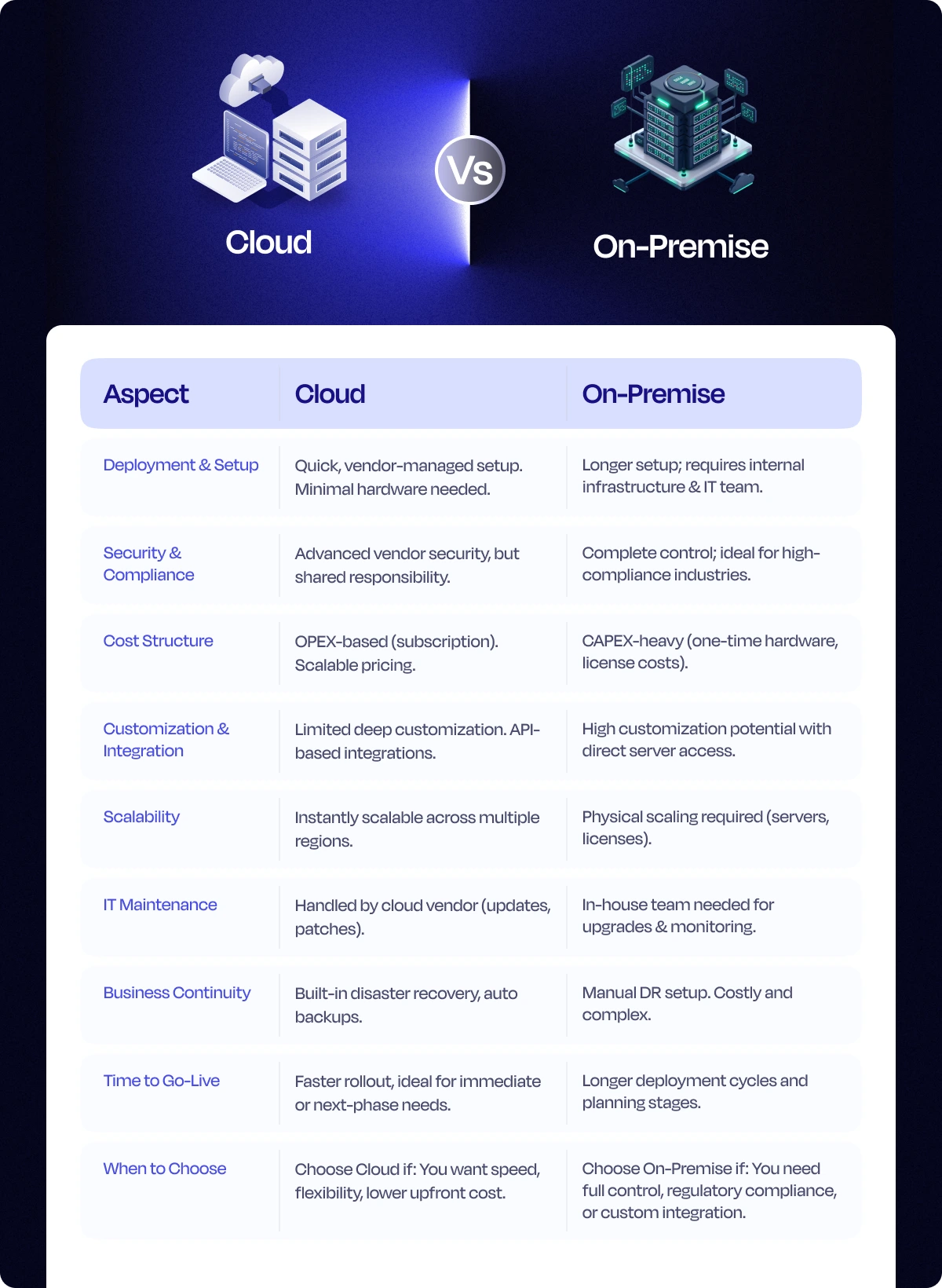
An on-premises enterprise app is software that is purchased and installed on an organization’s hardware or server to manage business and IT needs. It gives you total control, but also total responsibility. You can handle updates, security and all IT maintenance. Overall, on-premises apps work well for industries with strict compliance needs.
However, it comes with higher costs and less flexibility than cloud solutions. If you are looking to use it, you must weigh down the pros and cons of control against long-term scalability, cost and resource planning.
What is a Cloud-Based Enterprise App?
A cloud-based enterprise app is software which is hosted by a third-party providers to run important operations over the internet instead of installing it on their own servers. It usually operates through cloud platforms like AWS, Microsoft Azure, or Google Cloud, hence your team can access it from anywhere, anytime.
These cloud-based enterprise apps are useful to automate tasks, improve teamwork, deliver services to customers and connect with other systems. Is your team often working remotely or across multiple regions? Then accessibility becomes a key factor for you.
Understanding Deployment Models
Now, let's understand the deployment models of both of them.
Cloud-Based Solutions
There are usually four types of cloud-based solutions: public, private, hybrid, and multi-cloud, but it's important to know which cloud solutions fit into your business.
#1. Public Cloud
A public cloud is owned and managed by third-party providers like AWS, Google Cloud, or Azure. Your business uses shared resources like storage and servers over the internet. It’s affordable, scalable, and easy to set up. However, since the infrastructure is shared, you have less control over customization and security. You pay only for what you use—no need for upfront hardware investment.
#2. Private Cloud
A private cloud is used by just one organization, either hosted on-site or by a third party. It offers more control, customization and security compared to public clouds. It is suitable for industries like finance or healthcare. It gives better data protection, but is expensive to build and maintain. You get dedicated infrastructure, which means better performance and privacy, but at a higher cost.
#3. Hybrid Cloud
A hybrid cloud is a combination of both public and private cloud setups. You can store sensitive data in the private cloud while running less critical tasks in the public cloud. This setup gives you flexibility, cost savings, and better resource use.
It’s a smart option for businesses that want control and security without giving up scalability. However, it can be complex to manage and integrate both environments effectively.
#4. Multi-Cloud
Multi-cloud means using multiple cloud services from different providers (like AWS + Google Cloud + Azure) at the same time, for different workloads or functions. Here, you are not tied to one vendor. It can be a mix of public clouds or a combination of public and private. Hence, it has minimum vendor lock-in, improves resilience, and optimizes performance.
On-Premise Solutions
There are two ways to deploy on-premises solutions.
#1. Traditional Data Centers
A traditional data center is a physical space owned and operated by a company where all servers, storage, and networking equipment are kept. As an organization, you are fully responsible for powering, cooling, maintaining and securing the hardware.
It gives full control over IT operations but requires heavy upfront investment, ongoing maintenance, and in-house IT staff.
#2. Self-Hosted Solutions
If you have an experienced IT team, you can install and run a self-hosted solution on your own company’s servers, either in a data center or on-site. Here, your in-house team needs to manage hardware, software updates, security, backups, and support.
It’s often chosen when you have strict security policies or don't want to involve any third party.
On Premise vs Cloud: Critical Comparison Factors for IT Leaders
Many IT leaders struggle with choosing between cloud and on-premise systems. To simplify your decision, we’ve compared the most important factors like security, compliance, and long-term flexibility so you can see which fits your business better.
#1. Data Security & Compliance
On-Premise: It is helpful for meeting strict regulations like HIPAA or GDPR, as you have full control over your data and where it's stored. Since everything runs on your own servers, you decide how security is handled. Eventually, you can have tight security across your organization.
Cloud: Cloud providers follow strong security standards and often meet certifications like FedRAMP. But your data is stored on their servers. It can be in different countries. So here you and the cloud solution providers have shared responsibilities and trust towards each other.
#2. Performance & Latency
On-Premise: Since everything runs locally, you will have faster performance and lower latency. It’s not dependent on internet bandwidth, which is a big plus for systems that can’t afford delays in their business.
Cloud: Can your operations tolerate a few seconds of delay? In case of cloud solutions, performance depends on your internet connection and the provider’s server location. For most general business apps, this is fine. But for latency-sensitive apps, you might face delays.
#3. Scalability & Maintenance
On-Premise: If you want to scale an on-premises solution, you will need to buy more hardware and might need to hire IT experts who can handle suitable tasks. This will eventually need more time, money, and effort.
Your team is also responsible for updates, security patches, and fixing issues, which can slow down productivity.
Cloud: You can scale up or down quickly based on demand, as it provides scalable resources and supports global, multi-region expansion for enterprises. Your team can work productively as updating patches and maintenance, all are handled by the provider.
#4. Total Cost of Ownership (TCO)
Ask yourself:
- What funding model aligns with your current and future procurement (RFP, RFQ, RFI) and SOW requirements?
- Are you prepared for higher initial capital investments, or would predictable monthly expenses be easier to manage?
On-Premise: it takes a big upfront cost for hardware, licenses, and setup. Plus, you will have ongoing expenses like electricity, space, and IT salaries. Over time, these can add up and make it expensive to maintain.
Cloud: In case of cloud solutions, you only need to pay a monthly subscription or the custom plan you choose. But you may face unexpected charges based on usage. Long-term savings depend on how well you manage your cloud resources.
#5. Vendor Lock-in Risk
On-Premise: As you have bought an on-premises solution for your personal use, you have full control and flexibility to switch tools or platforms whenever needed. But your in-house team has to manage everything in-house can become complex and limit access to modern tools.
Cloud: Many providers use proprietary tools, which can be harder to switch later. Also, migrating data or apps out of one cloud to another can be challenging. However, using open-source platforms or hybrid solutions can help reduce this risk.
#6. Implementation Speed and Delivery Timelines
According to Gartner, using cloud solutions can speed up project delivery by up to 35% compared to traditional on-premise setups.
Cloud Apps: They can be launched quickly. Most deployments can be completed in weeks, so they are suitable to meet urgent goals.
On-Premise: On-premises solutions take time to deploy and are typically slower due to procurement cycles, infrastructure build-out, and resource requirements.
Typical Timeline:
- Cloud deployment: 6 to 12 weeks
- On-premise: 6 to 9 months
Decision Checklist: Cloud-Based vs On-Premise
Here are the essential questions to consider when you partner with an enterprise app development company or evaluate app development services.
- Does your organization require rapid rollout and scaling across multiple regions?
- Is ongoing or recurring vendor support a necessity?
- Are there strict regulatory or compliance requirements that favor direct security control?
- What’s your partnership or technology partner intent? Do you prefer long-term managed service or full internal control?
- What is your enterprise’s budget allocation for initial and recurring costs?
- Is urgent delivery and immediate launch a key driver?
- How do you rate your team’s technical resources and integration capability?
How To Evaluate: Practical Steps for Vendor Selection
Selecting the right vendor is a big deal because the right partner will support your vision, ensure compliance, build the right solution, and support you all the way. Follow these steps to evaluate the vendor.
- First, know what you need. Create a list of your business goals and technical requirements.
- Send detailed proposals to potential vendors. Ask for quotes from companies who has experience in your industry so you can compare them fairly.
- Ask for case studies. Look for real examples of how the vendor has handled big, complex projects, especially ones that involved collaboration and enterprise-scale rollout.
- Choose a vendor who has a solid history in building enterprise apps, development consulting, managed services, and custom development.
- Make sure the vendor can handle your data security needs, system integrations, and compliance requirements
How to Decide Between Cloud-Based vs On-Premise?
Both cloud-based solutions and on-premises solutions have their own pros and cons. But as every enterprise's requirements are different, it's important to know when to choose what.
Choose Cloud-Based Apps
- If your business operates across multiple regions, grows quickly, or needs frequent scaling.
- If you have a budget set aside for regular service payments instead of big upfront costs.
- If you have an urgent requirement to go live.
- If you want long-term ongoing managed service, support, and partnership with preferred vendors.
Choose On-Premise Apps
- If you have strict compliance or bespoke security policies for your business operations.
- If you have an approved budget for infrastructure, a dedicated technical team, and team extension.
- If you need full control over your data, systems, and security.
- If you already have a strong in-house IT infrastructure and support.
- If you want to avoid long-term dependency on external vendors.
- If your workflows depend heavily on legacy systems that can't be integrated with cloud platforms.
- If you prefer a one-time investment over ongoing service costs.
Conclusion
Choosing between on-premise and cloud-based apps has become a critical concern for modern businesses these days as things are rapidly shifting toward digital-first operations, faster deployment needs, and scalable infrastructure demands. According to Garner's research, the global cloud managed services market size will reach up to USD 305.16 billion by 2030.
In the end, the right choice will depend on your business goals and future plans. Don’t just choose for today. Think about how your decision supports your business over the next 3–5 years. Cloud solutions offer a practical way to simplify operations and stay flexible. But on-premise can better align with your long-term data strategy.
Confused about which app deployment model aligns with your growth plans? Book a free consultation call today. At Expert App Devs, we hold deep expertise in enterprise app development, custom solutions, managed services and more. We can help you evaluate cloud vs. on-premise apps based on security, costs, and long-term scalability.
Common FAQs for C-Level Executives
#1. What is more cost-effective for large-scale enterprises, cloud or on-premise?
Cloud-based solutions are affordable for large enterprises in the long run because they reduce upfront hardware costs, offer flexible pricing, and lower maintenance expenses. On the other side, on-premises is a better choice for the organization who prioritizes data security and wants full control.
#2. Which is better for compliance-heavy industries?
If you are in a compliance-heavy industry like healthcare, finance, or government, on-premise solutions are better because you can manage data storage, security and access everything by yourself.
#3. How do partnerships and collaborations influence app success?
Partnerships and collaborations affect your app's success because they include consulting, team extension, and dedicated support, which are important for enterprise app performance.
#4. Do cloud apps offer better integration?
Yes, cloud apps usually offer better integration. They are designed to easily connect with other tools, platforms, and services, especially with the cloud. Eventually, cloud apps automate workflows, share data between systems, and scale operations without heavy setup or manual processes.
#5. When should you start the RFP or vendor shortlist phase?
Start the RFP (Request for Proposal) or vendor shortlist phase as soon as your project goals, budget, and key requirements are clear. This will help you get the right partner and provide you with enough time for planning, comparison and deciding accordingly.




 162
162

 0
0


 301
4
301
4
 152
0
152
0
 124
0
124
0